> ## Documentation Index
> Fetch the complete documentation index at: https://www.adaline.ai/docs/llms.txt
> Use this file to discover all available pages before exploring further.
# Overview
> Create, edit, test, version, evaluate, improve, and deploy prompt behavior from the project workspace
Prompts are the main levers your AI application uses at runtime. A prompt can include model settings, messages, variables, files, tools, response formats, evaluators, datasets, versions, and deployments.
In the self-improving loop, prompts are the change surface. Logs and Behaviors explain how the current prompt behaves in production; Evaluators and Datasets define what must be preserved; Improve or human editing creates the next candidate; Deploy makes the reviewed version available to your application.
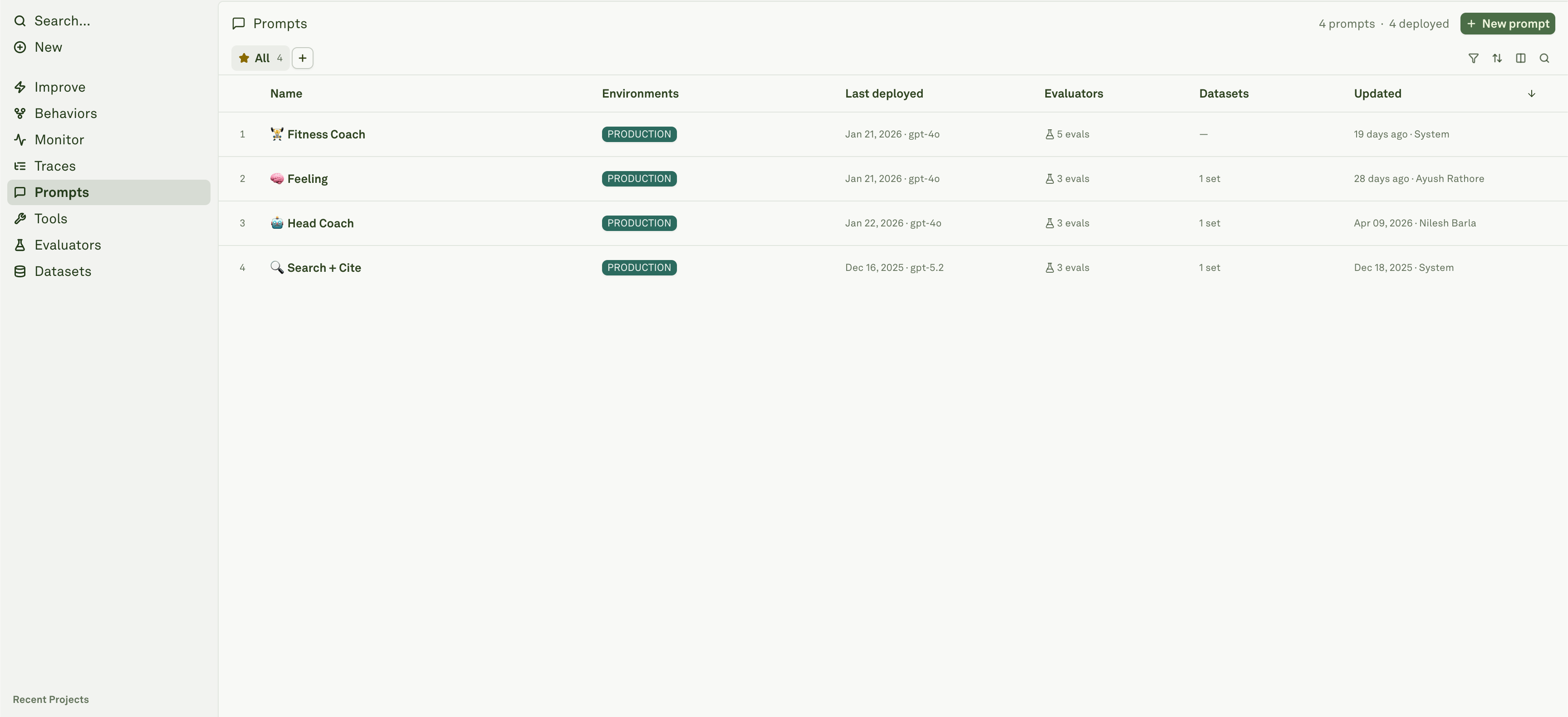 ## What a prompt contains
| Area | What you configure |
| ------------------ | ----------------------------------------------------------------------------------------- |
| **Model settings** | Provider, model, temperature, max tokens, response format, and other generation controls. |
| **Messages** | System, user, assistant, and tool messages with text, images, PDFs, and examples. |
| **Variables** | Runtime inputs such as `{{user_question}}`, `{{context}}`, or API/prompt-backed values. |
| **Tools** | Project tools and optional MCP server tools when enabled. |
| **Evaluation** | Linked datasets and evaluators for testing across cases. |
| **Versioning** | Drafts, snapshots, deployment history, and Improve candidates. |
## Build and test
## What a prompt contains
| Area | What you configure |
| ------------------ | ----------------------------------------------------------------------------------------- |
| **Model settings** | Provider, model, temperature, max tokens, response format, and other generation controls. |
| **Messages** | System, user, assistant, and tool messages with text, images, PDFs, and examples. |
| **Variables** | Runtime inputs such as `{{user_question}}`, `{{context}}`, or API/prompt-backed values. |
| **Tools** | Project tools and optional MCP server tools when enabled. |
| **Evaluation** | Linked datasets and evaluators for testing across cases. |
| **Versioning** | Drafts, snapshots, deployment history, and Improve candidates. |
## Build and test
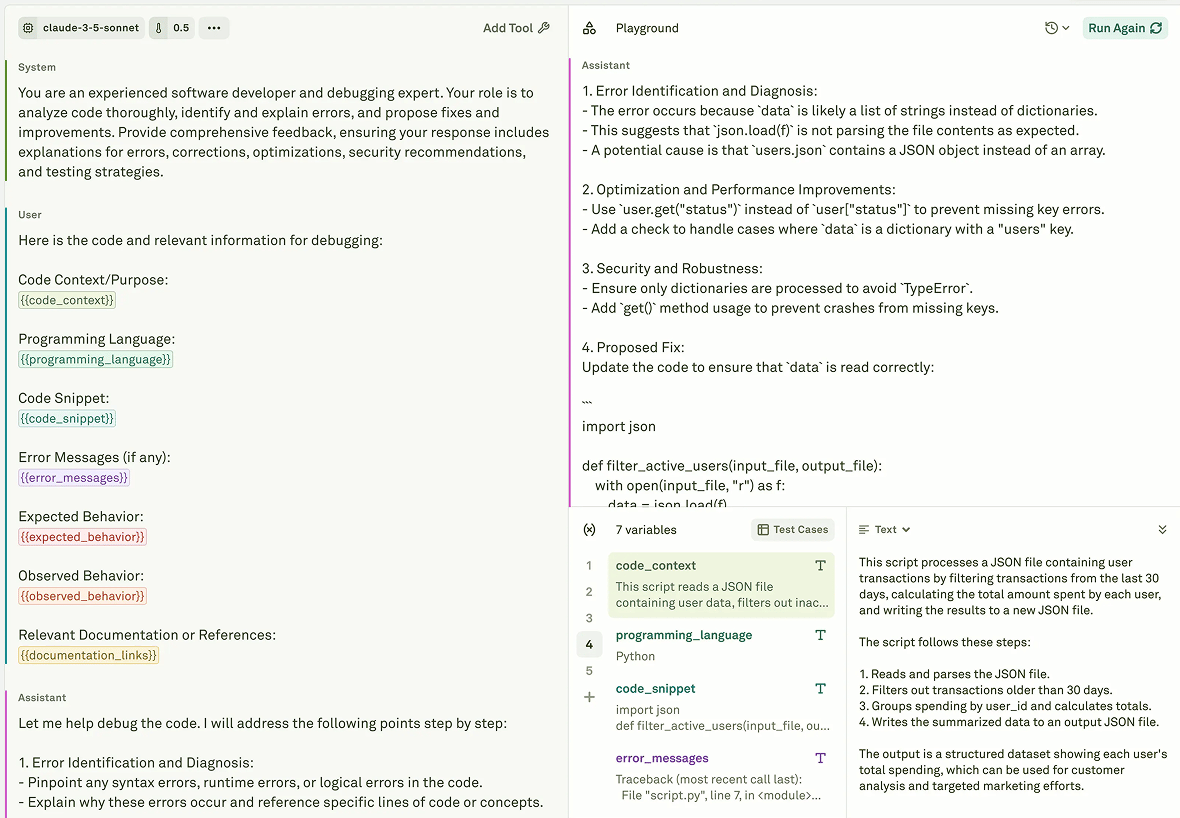 The authoring loop is:
1. Choose a model and configure generation parameters.
2. Compose messages with roles and content.
3. Add variables for runtime inputs.
4. Attach tools when the model needs external actions or data.
5. Run the prompt in the playground with representative inputs.
6. Link datasets and evaluators before deployment.
For the step-by-step workflow, see [Build and test prompts](/iterate/run-prompts-in-playground).
## Messages, variables, and tools
Older prompt docs called this the Iterate workflow. In the current Platform sidebar, the same authoring concepts live under Prompts.
| Concept | Use it for |
| -------------------- | ------------------------------------------------------------------------------ |
| **Roles** | Structure system, user, assistant, and tool context. |
| **Text** | Write instructions, examples, comments, and variable placeholders. |
| **Images and PDFs** | Add multimodal context for supported models. |
| **Variables** | Make prompts reusable across users, datasets, API inputs, and chained prompts. |
| **API variables** | Fetch live data into prompt context. |
| **Prompt variables** | Use one prompt's output as another prompt's input. |
| **Tools and MCP** | Let the model call external functions, APIs, retrieval systems, or MCP tools. |
Keep variable names stable. Datasets, dynamic columns, API integrations, and chained prompts depend on them resolving consistently.
## Playground
The authoring loop is:
1. Choose a model and configure generation parameters.
2. Compose messages with roles and content.
3. Add variables for runtime inputs.
4. Attach tools when the model needs external actions or data.
5. Run the prompt in the playground with representative inputs.
6. Link datasets and evaluators before deployment.
For the step-by-step workflow, see [Build and test prompts](/iterate/run-prompts-in-playground).
## Messages, variables, and tools
Older prompt docs called this the Iterate workflow. In the current Platform sidebar, the same authoring concepts live under Prompts.
| Concept | Use it for |
| -------------------- | ------------------------------------------------------------------------------ |
| **Roles** | Structure system, user, assistant, and tool context. |
| **Text** | Write instructions, examples, comments, and variable placeholders. |
| **Images and PDFs** | Add multimodal context for supported models. |
| **Variables** | Make prompts reusable across users, datasets, API inputs, and chained prompts. |
| **API variables** | Fetch live data into prompt context. |
| **Prompt variables** | Use one prompt's output as another prompt's input. |
| **Tools and MCP** | Let the model call external functions, APIs, retrieval systems, or MCP tools. |
Keep variable names stable. Datasets, dynamic columns, API integrations, and chained prompts depend on them resolving consistently.
## Playground
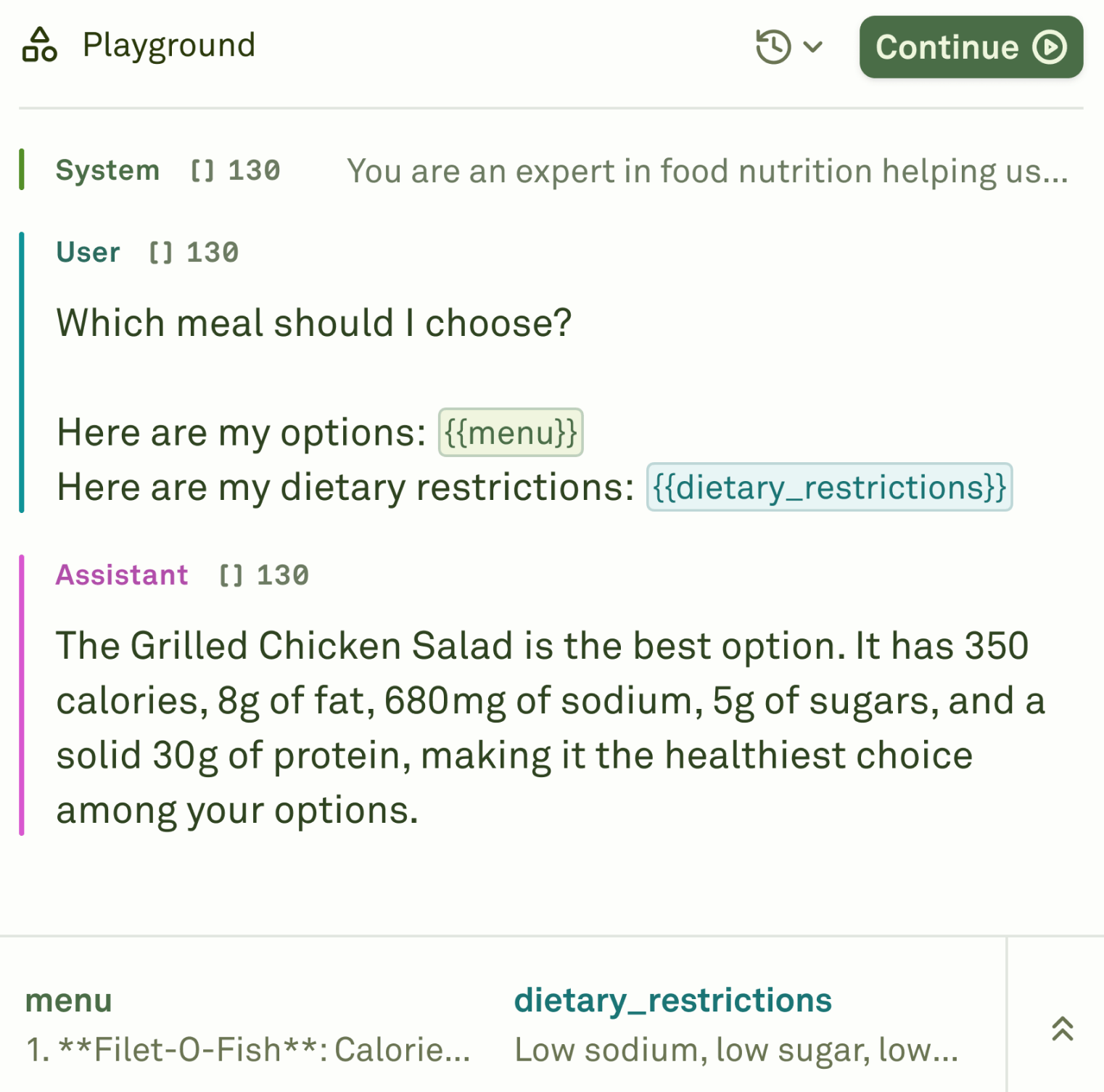 Use the playground to execute prompts with specific inputs, inspect model responses, compare configurations, and debug tool calls before running larger evaluations.
The playground is useful for fast iteration, but it is not a replacement for datasets and evaluators. Use it to understand behavior, then run evaluations to test many cases.
## Versioning and deployment
Editing a prompt changes the draft. Deployment creates a snapshot for an environment. Your application should read from the deployment environment it expects, not from an arbitrary draft.
| State | Meaning |
| ------------------------------ | -------------------------------------------------------------------------------------------- |
| **Draft/editor state** | Where prompt editing and playground work happen. |
| **Prompt version or snapshot** | Captured state used for review or deployment. |
| **Deployment snapshot** | What an application environment reads at runtime. |
| **Improve approval** | Can apply a candidate and deploy it, while **Edit & approve** applies it without deployment. |
Use prompt versions and deployment snapshots as the release model for production changes.
## Prompts in the Platform workflow
* **Tools** define callable functions or HTTP-backed actions.
* **Evaluators** define success criteria.
* **Datasets** provide test cases.
* **Logs** show deployed prompt behavior in production.
* **Behaviors** cluster recurring outcomes.
* **Improve** proposes prompt changes from those signals.
* **Deploy** ships a prompt version to an environment.
Configure messages, variables, model settings, tools, datasets, and playground runs.
Understand drafts, snapshots, deployment environments, approval, and rollback.
Define reusable tool schemas and HTTP-backed actions.
Define pass/fail, scoring, cost, latency, and formatting criteria.
Use the playground to execute prompts with specific inputs, inspect model responses, compare configurations, and debug tool calls before running larger evaluations.
The playground is useful for fast iteration, but it is not a replacement for datasets and evaluators. Use it to understand behavior, then run evaluations to test many cases.
## Versioning and deployment
Editing a prompt changes the draft. Deployment creates a snapshot for an environment. Your application should read from the deployment environment it expects, not from an arbitrary draft.
| State | Meaning |
| ------------------------------ | -------------------------------------------------------------------------------------------- |
| **Draft/editor state** | Where prompt editing and playground work happen. |
| **Prompt version or snapshot** | Captured state used for review or deployment. |
| **Deployment snapshot** | What an application environment reads at runtime. |
| **Improve approval** | Can apply a candidate and deploy it, while **Edit & approve** applies it without deployment. |
Use prompt versions and deployment snapshots as the release model for production changes.
## Prompts in the Platform workflow
* **Tools** define callable functions or HTTP-backed actions.
* **Evaluators** define success criteria.
* **Datasets** provide test cases.
* **Logs** show deployed prompt behavior in production.
* **Behaviors** cluster recurring outcomes.
* **Improve** proposes prompt changes from those signals.
* **Deploy** ships a prompt version to an environment.
Configure messages, variables, model settings, tools, datasets, and playground runs.
Understand drafts, snapshots, deployment environments, approval, and rollback.
Define reusable tool schemas and HTTP-backed actions.
Define pass/fail, scoring, cost, latency, and formatting criteria.