> ## Documentation Index
> Fetch the complete documentation index at: https://www.adaline.ai/docs/llms.txt
> Use this file to discover all available pages before exploring further.
# Use other prompts in prompts
> Chain prompts together by using the output of one prompt as input to another
Prompt variables enable **prompt chaining** — a pattern where the output of one prompt serves as the input for another. This transforms static prompts into modular, agent-like workflows where each step in a pipeline can be independently authored, tested, and refined.
## How it works
When you configure a variable with a **Prompt** source:
1. **Selection** — You choose another prompt from your project as the variable source.
2. **Execution** — At runtime, the system executes the referenced prompt first.
3. **Integration** — The output of the referenced prompt becomes the value of your variable, injected into the parent prompt before it is sent to the model.
## Set up a prompt variable
Add a `{{variable_name}}` placeholder in your prompt. The variable appears in the Variable Editor.
In the Variable Editor, click on the variable and select **Prompt** as the source type.
Select a prompt from the dropdown. The system will automatically execute it and use its output as the variable value.
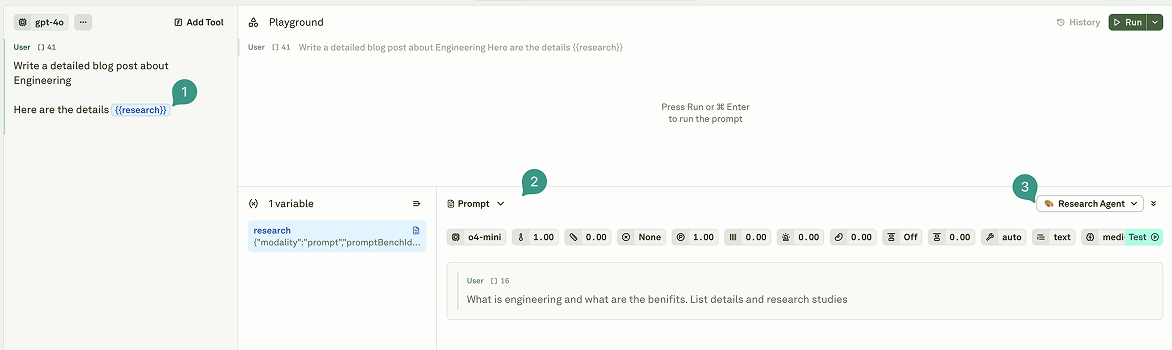 Data from the parent prompt's linked dataset is automatically passed to the referenced prompt. Child prompts can access any column available in the parent dataset.
## Key capabilities
Prompt variables provide powerful orchestration features:
| Capability | Description |
| ------------------------- | ----------------------------------------------------------------------------------------------------------------------------- |
| **Recursive resolution** | The system resolves nested variables automatically, supporting multi-level prompt hierarchies. |
| **Parallel execution** | Independent referenced prompts are executed simultaneously to reduce latency. |
| **Dependency management** | Circular dependencies (e.g., Prompt A references Prompt B, which references Prompt A) are automatically detected and blocked. |
| **Context preservation** | The full context from the parent prompt's dataset row is available to child prompts. |
## Dataset integration
When prompt variables are used with a [linked dataset](/docs/iterate/link-datasets-in-playground), they function as **dynamic columns**:
* **Row-level execution** — Each dataset row triggers its own unique prompt execution, producing a distinct result per row.
* **Sequential vs. parallel** — Dependent variables (where one relies on the result of another) run sequentially. Independent variables run in parallel.
* **Result persistence** — Outputs are stored in the dataset cells and can be used for subsequent [evaluations](/docs/evaluate/overview).
### Data flow
Child prompts can reference any column available in the parent dataset. For example, if your parent prompt has a dataset with columns `userId` and `query`, the child prompt can access both `{{userId}}` and `{{query}}`.
Child prompts' linked datasets are **ignored** during resolution. All variables referenced in child prompts must be present in the **parent prompt's** linked dataset.
## Execution behavior
| Setting | Value |
| ---------------------- | --------------------------------------------------------- |
| **Timeout** | 120 seconds per prompt execution |
| **Nesting depth** | Recommended maximum of 2–3 levels for optimal performance |
| **Parallel execution** | Independent prompts at the same level run simultaneously |
## Error handling
| Error type | Cause | Result |
| ----------------------- | ---------------------------------------------------------- | ---------------------------------------------------------------- |
| **Circular dependency** | Prompt A calls B, and B calls A (directly or indirectly). | Execution stops immediately. |
| **Missing column** | A variable references a dataset column that doesn't exist. | Execution fails before the run starts. |
| **Prompt failure** | The referenced prompt fails or times out. | The parent prompt fails and the error propagates. |
| **Unresolved variable** | A variable is not found in the dataset. | The placeholder (e.g., `{{variable_name}}`) remains as raw text. |
## Use cases
Prompt variables are ideal for:
* **Multi-step reasoning** — Break complex tasks into smaller, focused prompts that execute in sequence (e.g., summarize a document, then classify the summary).
* **Agent workflows** — Build agent-like systems where one prompt's output informs the next decision or action.
* **Modular design** — Create reusable prompt components that can be combined in different configurations.
* **Output transformation** — Pass the raw output of one prompt through another for formatting, translation, or filtering.
## Best practices
* **Limit nesting to 2–3 levels** — Deeper hierarchies degrade performance and make debugging difficult.
* **Use descriptive names** — Name variables like `{{user_purchase_history}}` rather than `{{var1}}` so that the prompt chain is self-documenting.
* **Test child prompts independently** — Verify that each prompt in the chain works correctly on its own before connecting them.
* **Watch for circular dependencies** — Although Adaline detects these automatically, designing your prompt architecture to avoid them simplifies debugging.
## Next steps
Fetch live data from external endpoints at runtime.
Learn about all variable types and sources.
Data from the parent prompt's linked dataset is automatically passed to the referenced prompt. Child prompts can access any column available in the parent dataset.
## Key capabilities
Prompt variables provide powerful orchestration features:
| Capability | Description |
| ------------------------- | ----------------------------------------------------------------------------------------------------------------------------- |
| **Recursive resolution** | The system resolves nested variables automatically, supporting multi-level prompt hierarchies. |
| **Parallel execution** | Independent referenced prompts are executed simultaneously to reduce latency. |
| **Dependency management** | Circular dependencies (e.g., Prompt A references Prompt B, which references Prompt A) are automatically detected and blocked. |
| **Context preservation** | The full context from the parent prompt's dataset row is available to child prompts. |
## Dataset integration
When prompt variables are used with a [linked dataset](/docs/iterate/link-datasets-in-playground), they function as **dynamic columns**:
* **Row-level execution** — Each dataset row triggers its own unique prompt execution, producing a distinct result per row.
* **Sequential vs. parallel** — Dependent variables (where one relies on the result of another) run sequentially. Independent variables run in parallel.
* **Result persistence** — Outputs are stored in the dataset cells and can be used for subsequent [evaluations](/docs/evaluate/overview).
### Data flow
Child prompts can reference any column available in the parent dataset. For example, if your parent prompt has a dataset with columns `userId` and `query`, the child prompt can access both `{{userId}}` and `{{query}}`.
Child prompts' linked datasets are **ignored** during resolution. All variables referenced in child prompts must be present in the **parent prompt's** linked dataset.
## Execution behavior
| Setting | Value |
| ---------------------- | --------------------------------------------------------- |
| **Timeout** | 120 seconds per prompt execution |
| **Nesting depth** | Recommended maximum of 2–3 levels for optimal performance |
| **Parallel execution** | Independent prompts at the same level run simultaneously |
## Error handling
| Error type | Cause | Result |
| ----------------------- | ---------------------------------------------------------- | ---------------------------------------------------------------- |
| **Circular dependency** | Prompt A calls B, and B calls A (directly or indirectly). | Execution stops immediately. |
| **Missing column** | A variable references a dataset column that doesn't exist. | Execution fails before the run starts. |
| **Prompt failure** | The referenced prompt fails or times out. | The parent prompt fails and the error propagates. |
| **Unresolved variable** | A variable is not found in the dataset. | The placeholder (e.g., `{{variable_name}}`) remains as raw text. |
## Use cases
Prompt variables are ideal for:
* **Multi-step reasoning** — Break complex tasks into smaller, focused prompts that execute in sequence (e.g., summarize a document, then classify the summary).
* **Agent workflows** — Build agent-like systems where one prompt's output informs the next decision or action.
* **Modular design** — Create reusable prompt components that can be combined in different configurations.
* **Output transformation** — Pass the raw output of one prompt through another for formatting, translation, or filtering.
## Best practices
* **Limit nesting to 2–3 levels** — Deeper hierarchies degrade performance and make debugging difficult.
* **Use descriptive names** — Name variables like `{{user_purchase_history}}` rather than `{{var1}}` so that the prompt chain is self-documenting.
* **Test child prompts independently** — Verify that each prompt in the chain works correctly on its own before connecting them.
* **Watch for circular dependencies** — Although Adaline detects these automatically, designing your prompt architecture to avoid them simplifies debugging.
## Next steps
Fetch live data from external endpoints at runtime.
Learn about all variable types and sources.