> ## Documentation Index
> Fetch the complete documentation index at: https://www.adaline.ai/docs/llms.txt
> Use this file to discover all available pages before exploring further.
# Trigger a Cycle
> Choose the prompt, focus behavior, thoroughness, and reviewers for a new Improve cycle
Trigger an Improve cycle when you want Adaline to propose a prompt change from production evidence. A cycle runs in the background and moves to **Pending review** only after it has produced reviewable evidence.
The best cycles start with a clear pattern: a Behavior, trace set, evaluator failure, or dataset gap.
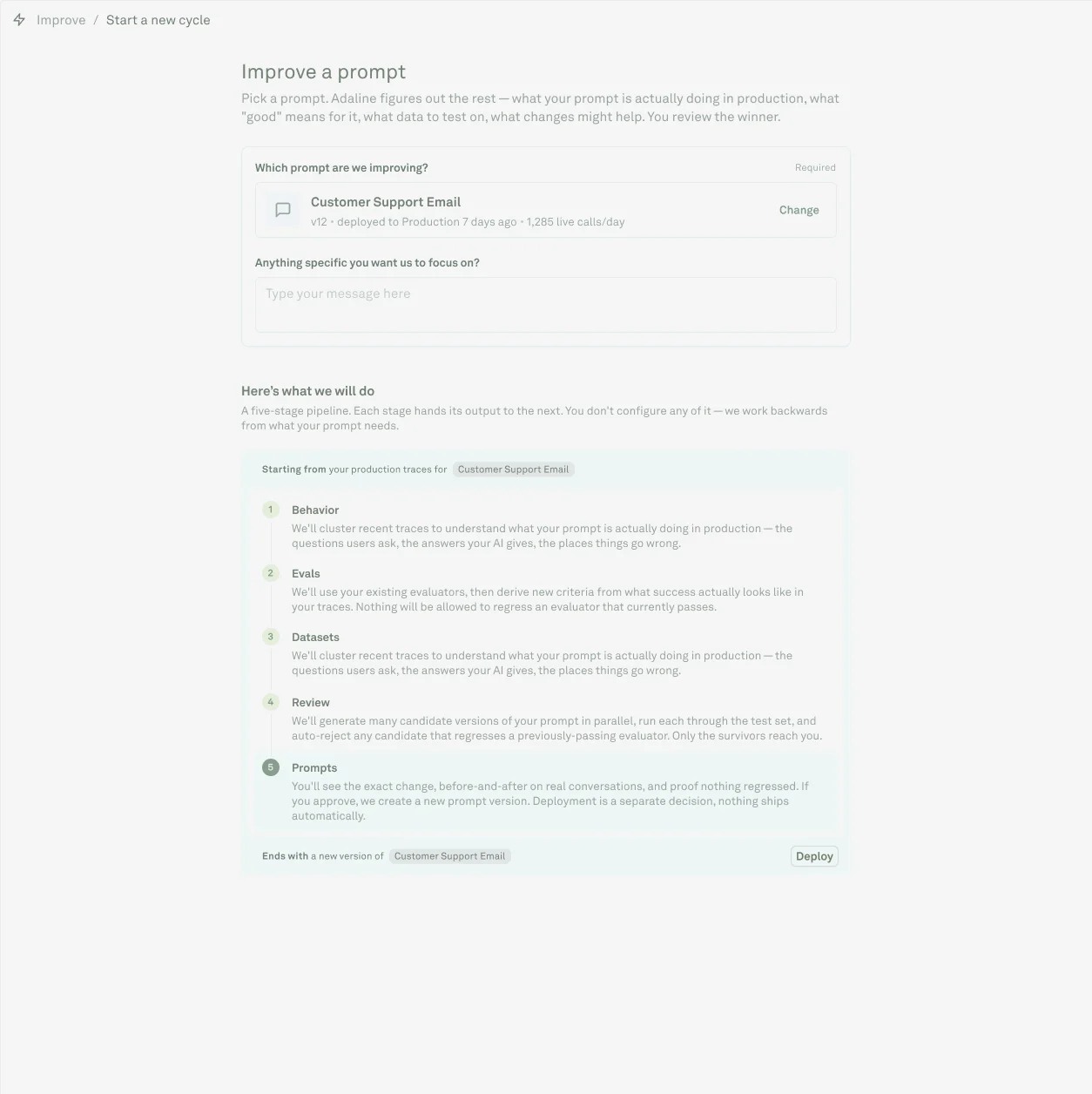 Open a project, then select **Improve**.
Click **Start improvement** and select the prompt Adaline should improve.
Describe the change you want. Name the failure mode, audience, policy, output format, tool behavior, or runtime tradeoff.
Select one or more Behaviors when you want the cycle to focus on known production patterns.
Choose **Quick**, **Standard**, or **Thorough** based on risk and urgency.
Add reviewers to notify, then click **Start cycle**.
## Choose thoroughness
| Preset | Use it when | Tradeoff |
| ------------ | --------------------------------------------------------- | ------------------------------------------------------ |
| **Quick** | The issue is narrow and already well covered. | Faster run, less exploration. |
| **Standard** | You need the normal balance of speed and evidence. | Best default for most prompt fixes. |
| **Thorough** | The issue is high-impact, ambiguous, or safety-sensitive. | Longer run with broader evidence and candidate search. |
Actual runtime depends on prompt size, trace volume, dataset size, evaluator cost, provider latency, and candidate count.
Unless your billing plan includes cycle runs, Improve cycles are charged per run. The free plan does not include cycle runs. Typical cycle costs are about USD 2 - USD 5 per run, depending on the run configuration and usage.
## Readiness checks
The run button may be disabled when Adaline does not have enough evidence. Common causes:
* The prompt has not produced production traces.
* Behaviors are not yet clustered for the prompt.
* No useful evaluation or dataset coverage exists for the target issue. This coverage is optional, but weak coverage makes the review decision less confident.
* The selected Behavior does not map cleanly to the selected prompt.
Fix this by sending traffic, improving instrumentation metadata, adding representative cases, or choosing a narrower Behavior.
## After starting
The cycle appears under **In progress** while Adaline analyzes Behaviors, inspects evaluators, prepares datasets, explores candidates, and builds the review packet. You can leave the page while the run continues.
Use the cycle list by status:
| View | Use it for |
| ------------------ | ---------------------------------------------------------------------------------------------- |
| **In progress** | Running cycles and evidence-generation stages. Open one to inspect progress or failures. |
| **Pending review** | Completed cycles waiting for a release decision. Review these first. |
| **History** | Approved, edited, rejected, failed, or canceled cycles. Use this for audit and release review. |
If the cycle fails, open the failed run and read the failure reason. Do not treat a failed cycle as a product decision; it usually means the run lacked evidence, scoring coverage, or a valid prompt diff.
Inspect the completed evidence packet and make a release decision.
Improve validation coverage before rerunning weak cycles.
Open a project, then select **Improve**.
Click **Start improvement** and select the prompt Adaline should improve.
Describe the change you want. Name the failure mode, audience, policy, output format, tool behavior, or runtime tradeoff.
Select one or more Behaviors when you want the cycle to focus on known production patterns.
Choose **Quick**, **Standard**, or **Thorough** based on risk and urgency.
Add reviewers to notify, then click **Start cycle**.
## Choose thoroughness
| Preset | Use it when | Tradeoff |
| ------------ | --------------------------------------------------------- | ------------------------------------------------------ |
| **Quick** | The issue is narrow and already well covered. | Faster run, less exploration. |
| **Standard** | You need the normal balance of speed and evidence. | Best default for most prompt fixes. |
| **Thorough** | The issue is high-impact, ambiguous, or safety-sensitive. | Longer run with broader evidence and candidate search. |
Actual runtime depends on prompt size, trace volume, dataset size, evaluator cost, provider latency, and candidate count.
Unless your billing plan includes cycle runs, Improve cycles are charged per run. The free plan does not include cycle runs. Typical cycle costs are about USD 2 - USD 5 per run, depending on the run configuration and usage.
## Readiness checks
The run button may be disabled when Adaline does not have enough evidence. Common causes:
* The prompt has not produced production traces.
* Behaviors are not yet clustered for the prompt.
* No useful evaluation or dataset coverage exists for the target issue. This coverage is optional, but weak coverage makes the review decision less confident.
* The selected Behavior does not map cleanly to the selected prompt.
Fix this by sending traffic, improving instrumentation metadata, adding representative cases, or choosing a narrower Behavior.
## After starting
The cycle appears under **In progress** while Adaline analyzes Behaviors, inspects evaluators, prepares datasets, explores candidates, and builds the review packet. You can leave the page while the run continues.
Use the cycle list by status:
| View | Use it for |
| ------------------ | ---------------------------------------------------------------------------------------------- |
| **In progress** | Running cycles and evidence-generation stages. Open one to inspect progress or failures. |
| **Pending review** | Completed cycles waiting for a release decision. Review these first. |
| **History** | Approved, edited, rejected, failed, or canceled cycles. Use this for audit and release review. |
If the cycle fails, open the failed run and read the failure reason. Do not treat a failed cycle as a product decision; it usually means the run lacked evidence, scoring coverage, or a valid prompt diff.
Inspect the completed evidence packet and make a release decision.
Improve validation coverage before rerunning weak cycles.