> ## Documentation Index
> Fetch the complete documentation index at: https://www.adaline.ai/docs/llms.txt
> Use this file to discover all available pages before exploring further.
# Review a Cycle
> Review diagnosis, candidate outputs, evaluator movement, traffic examples, and deployment impact before approving
Every completed Improve cycle pauses for human or external AI review. Use the review page to decide whether Adaline's candidate should be approved, edited, or rejected.
The reviewer, whether a person or external AI agent, owns the production decision: the diagnosis must match the real issue, the diff must be understandable, impact must be acceptable, and the deployment target must be correct.
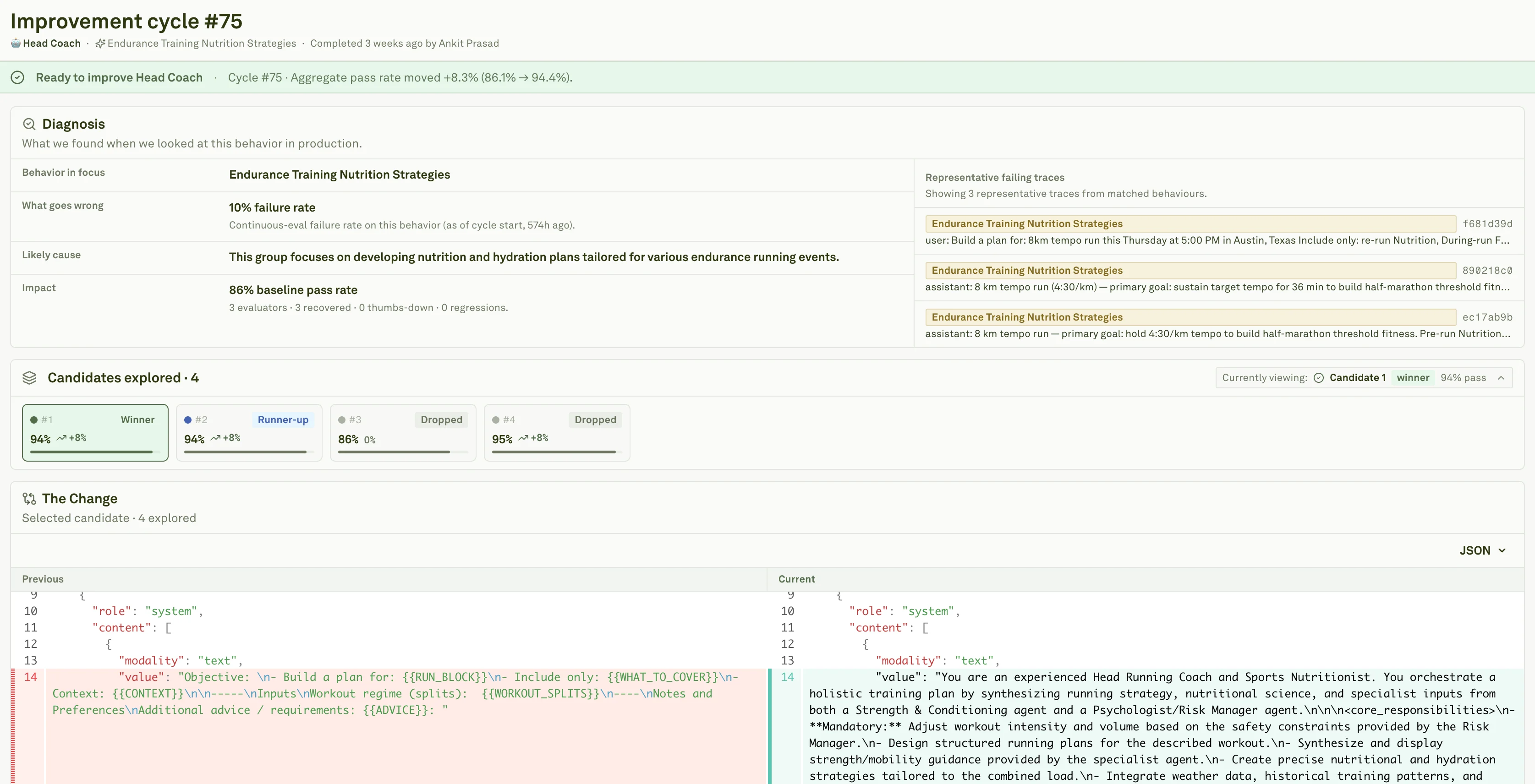 ## Read the review page top to bottom
Start with the evidence path. A good review package shows how the cycle moved from production evidence to candidate prompt changes, and whether each stage produced enough signal to support a release decision.
## Read the review page top to bottom
Start with the evidence path. A good review package shows how the cycle moved from production evidence to candidate prompt changes, and whether each stage produced enough signal to support a release decision.
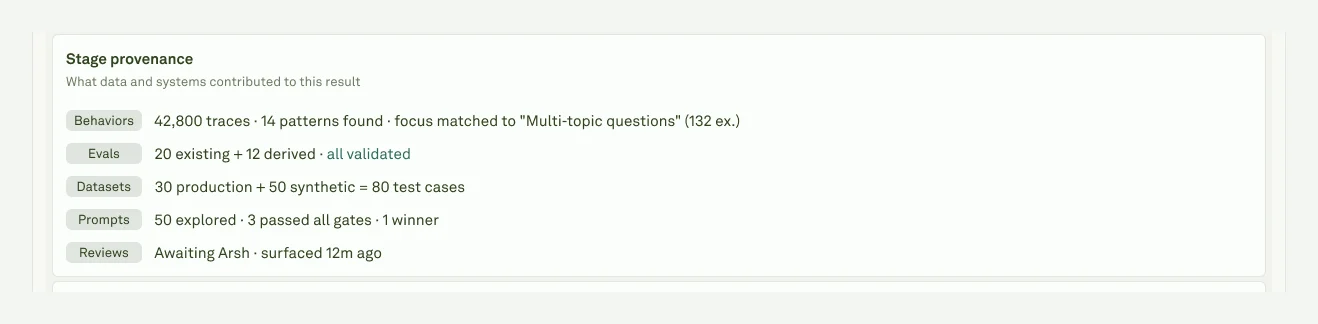 | Stage | What to check |
| ------------- | ----------------------------------------------------------------------------------------------------- |
| **Behaviors** | The run targeted a specific repeated pattern or issue. |
| **Evals** | Authored and auto generated evaluators cover the target behavior and important healthy paths. |
| **Datasets** | Production, curated, and synthetic cases are representative enough to compare baseline and candidate. |
| **Prompts** | Multiple candidates were explored, and unsafe or regressing options were filtered out. |
| **Review** | The selected candidate has a diff, traffic examples, score movement, and runtime tradeoffs. |
Then move through the candidate review itself. Read the diagnosis first, confirm the selected candidate, inspect the diff, compare example outputs, check regressions, and only then look at deployment impact.
| Stage | What to check |
| ------------- | ----------------------------------------------------------------------------------------------------- |
| **Behaviors** | The run targeted a specific repeated pattern or issue. |
| **Evals** | Authored and auto generated evaluators cover the target behavior and important healthy paths. |
| **Datasets** | Production, curated, and synthetic cases are representative enough to compare baseline and candidate. |
| **Prompts** | Multiple candidates were explored, and unsafe or regressing options were filtered out. |
| **Review** | The selected candidate has a diff, traffic examples, score movement, and runtime tradeoffs. |
Then move through the candidate review itself. Read the diagnosis first, confirm the selected candidate, inspect the diff, compare example outputs, check regressions, and only then look at deployment impact.
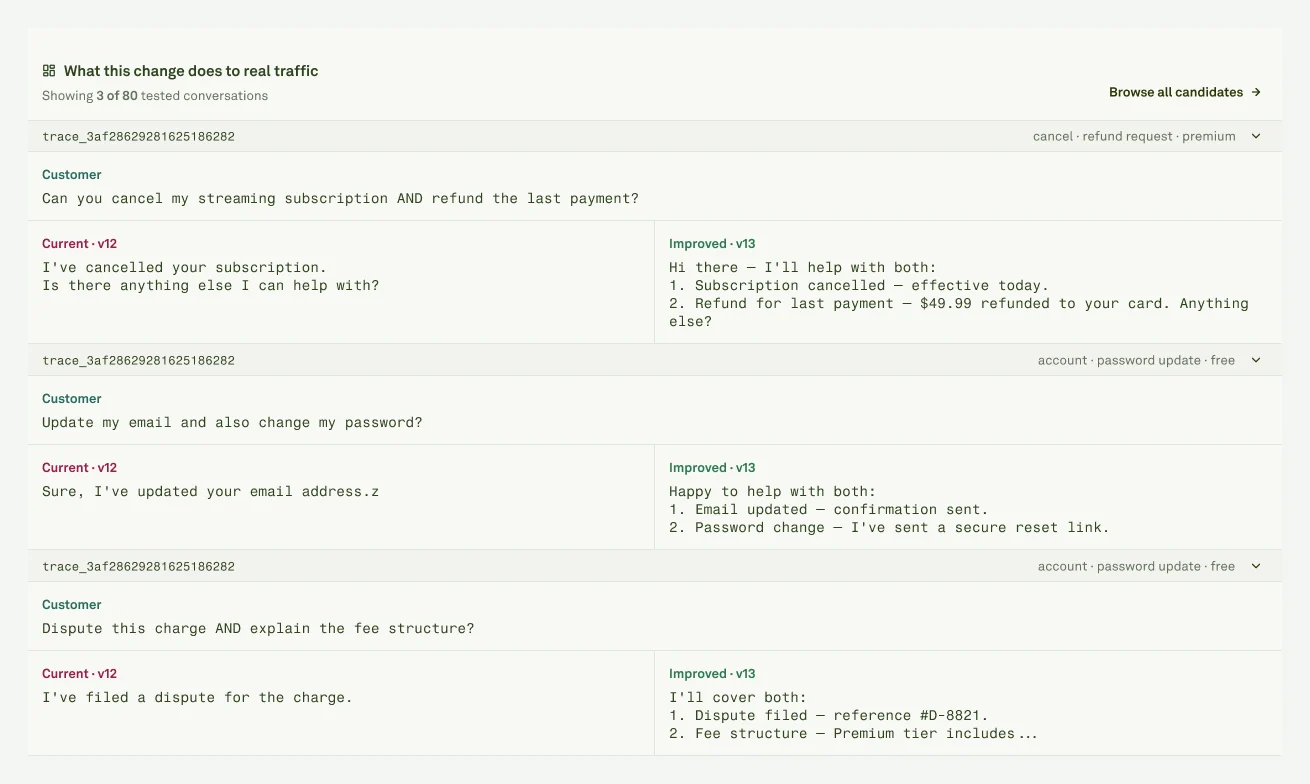 | Section | Question | Stop if |
| ------------------------- | ----------------------------------------------- | ----------------------------------------------------------------------- |
| **Diagnosis** | What problem did Adaline try to fix? | It does not match the customer or product issue. |
| **Candidate** | Which candidate is selected? | It is not the candidate you intend to apply. |
| **Prompt diff** | What exactly changes? | The diff changes policy, format, tool behavior, or tone in a risky way. |
| **Traffic comparison** | Would real users get a better answer? | Scores improved but the user experience got worse. |
| **Regression report** | Which checks improved or regressed? | A protected evaluator drops without explicit signoff. |
| **Cost, tokens, latency** | What runtime tradeoff comes with the candidate? | The movement breaks the release budget. |
| **Deployment target** | Which environment changes if approved? | The target environment is wrong or unclear. |
| Section | Question | Stop if |
| ------------------------- | ----------------------------------------------- | ----------------------------------------------------------------------- |
| **Diagnosis** | What problem did Adaline try to fix? | It does not match the customer or product issue. |
| **Candidate** | Which candidate is selected? | It is not the candidate you intend to apply. |
| **Prompt diff** | What exactly changes? | The diff changes policy, format, tool behavior, or tone in a risky way. |
| **Traffic comparison** | Would real users get a better answer? | Scores improved but the user experience got worse. |
| **Regression report** | Which checks improved or regressed? | A protected evaluator drops without explicit signoff. |
| **Cost, tokens, latency** | What runtime tradeoff comes with the candidate? | The movement breaks the release budget. |
| **Deployment target** | Which environment changes if approved? | The target environment is wrong or unclear. |
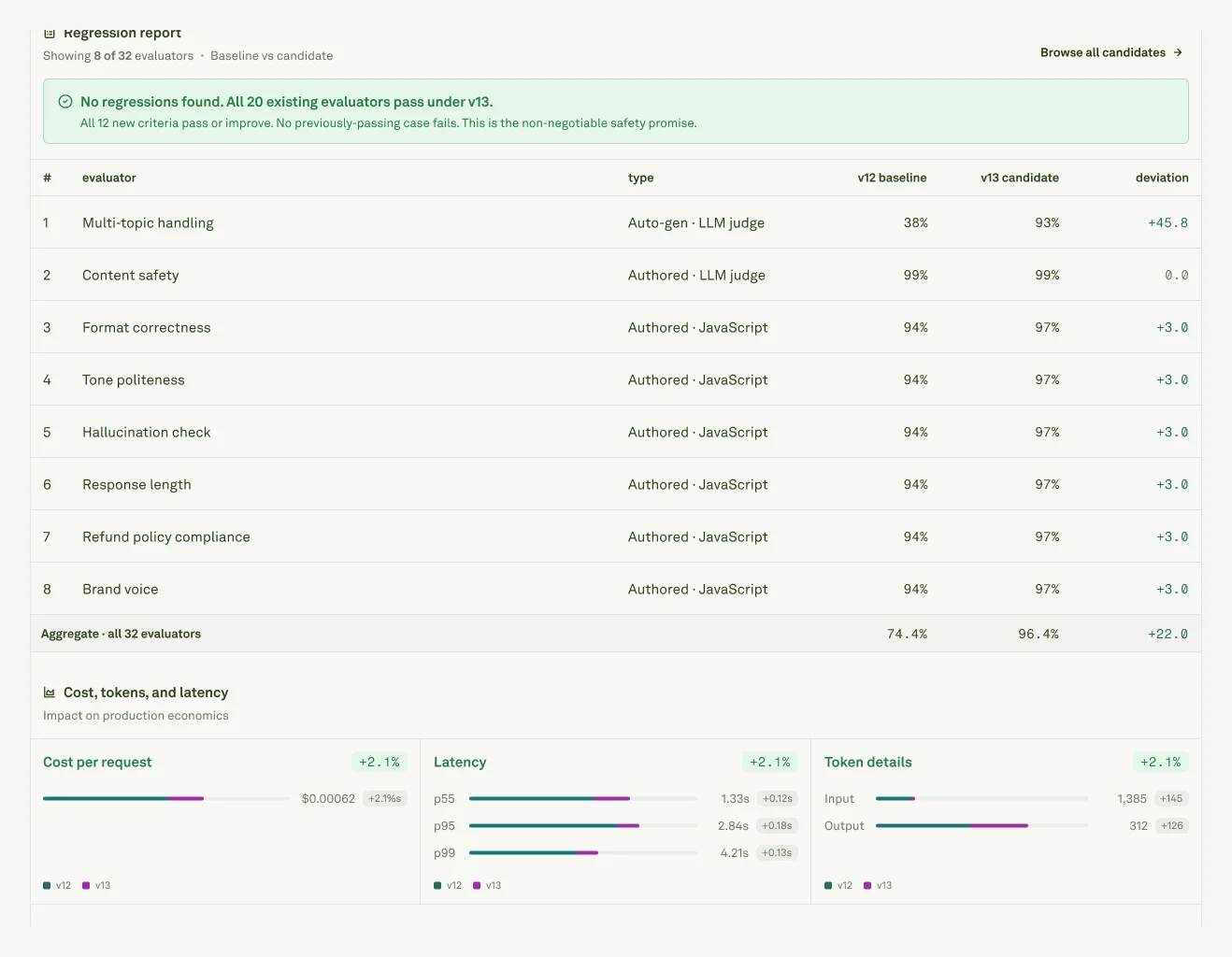 Before approving, make sure the diagnosis matches the customer or product problem, the supporting Behaviors and logs are relevant, the prompt diff is understandable, evaluator or dataset regressions are acceptable, runtime impact is acceptable, and the deployment target is the one you intend to change.
Approve can affect production when the project has a deployment environment. Use **Edit & approve** when you want to inspect or adjust the prompt before deployment.
## After the decision
Before approving, make sure the diagnosis matches the customer or product problem, the supporting Behaviors and logs are relevant, the prompt diff is understandable, evaluator or dataset regressions are acceptable, runtime impact is acceptable, and the deployment target is the one you intend to change.
Approve can affect production when the project has a deployment environment. Use **Edit & approve** when you want to inspect or adjust the prompt before deployment.
## After the decision
 | Decision | What to do next |
| ------------------ | ----------------------------------------------------------------------------------------------------------------------------------------------------------------------------------------------------------------------------- |
| **Approve** | Apply the selected candidate and deploy it when a primary environment is configured. Watch [Monitor](/monitor/overview), [Logs](/monitor/analyze-log-traces), and [Behaviors](/behaviors/overview) during the release window. |
| **Edit & approve** | Apply the candidate, inspect or adjust the prompt, run evaluations, then release through [Deploy your prompt](/deploy/deploy-your-prompt) or your external deployment path. |
| **Reject** | Leave the prompt unchanged and record the reason: wrong diagnosis, weak evidence, regression, runtime cost, or wrong fix layer. |
You can also export the audit packet as JSON for records, external AI review, or a no-human-in-the-loop handoff before deciding what happens next.
Download the review evidence as JSON for records or external systems.
Understand candidate exploration, safety gates, and scoring evidence.
See how generated evaluators help check the candidate before release.
Continue from reviewed prompt version to deployment.
| Decision | What to do next |
| ------------------ | ----------------------------------------------------------------------------------------------------------------------------------------------------------------------------------------------------------------------------- |
| **Approve** | Apply the selected candidate and deploy it when a primary environment is configured. Watch [Monitor](/monitor/overview), [Logs](/monitor/analyze-log-traces), and [Behaviors](/behaviors/overview) during the release window. |
| **Edit & approve** | Apply the candidate, inspect or adjust the prompt, run evaluations, then release through [Deploy your prompt](/deploy/deploy-your-prompt) or your external deployment path. |
| **Reject** | Leave the prompt unchanged and record the reason: wrong diagnosis, weak evidence, regression, runtime cost, or wrong fix layer. |
You can also export the audit packet as JSON for records, external AI review, or a no-human-in-the-loop handoff before deciding what happens next.
Download the review evidence as JSON for records or external systems.
Understand candidate exploration, safety gates, and scoring evidence.
See how generated evaluators help check the candidate before release.
Continue from reviewed prompt version to deployment.