> ## Documentation Index
> Fetch the complete documentation index at: https://www.adaline.ai/docs/llms.txt
> Use this file to discover all available pages before exploring further.
# Auto Prompt Optimization
> Understand Improve candidate generation, safety gates, prompt diffs, regression reports, traffic comparisons, and release signals
Auto Prompt Optimization is the part of Improve that proposes prompt changes. Adaline generates candidate prompt snapshots, scores them against available evidence, rejects unsafe or regressing candidates, and packages the selected candidate for review.
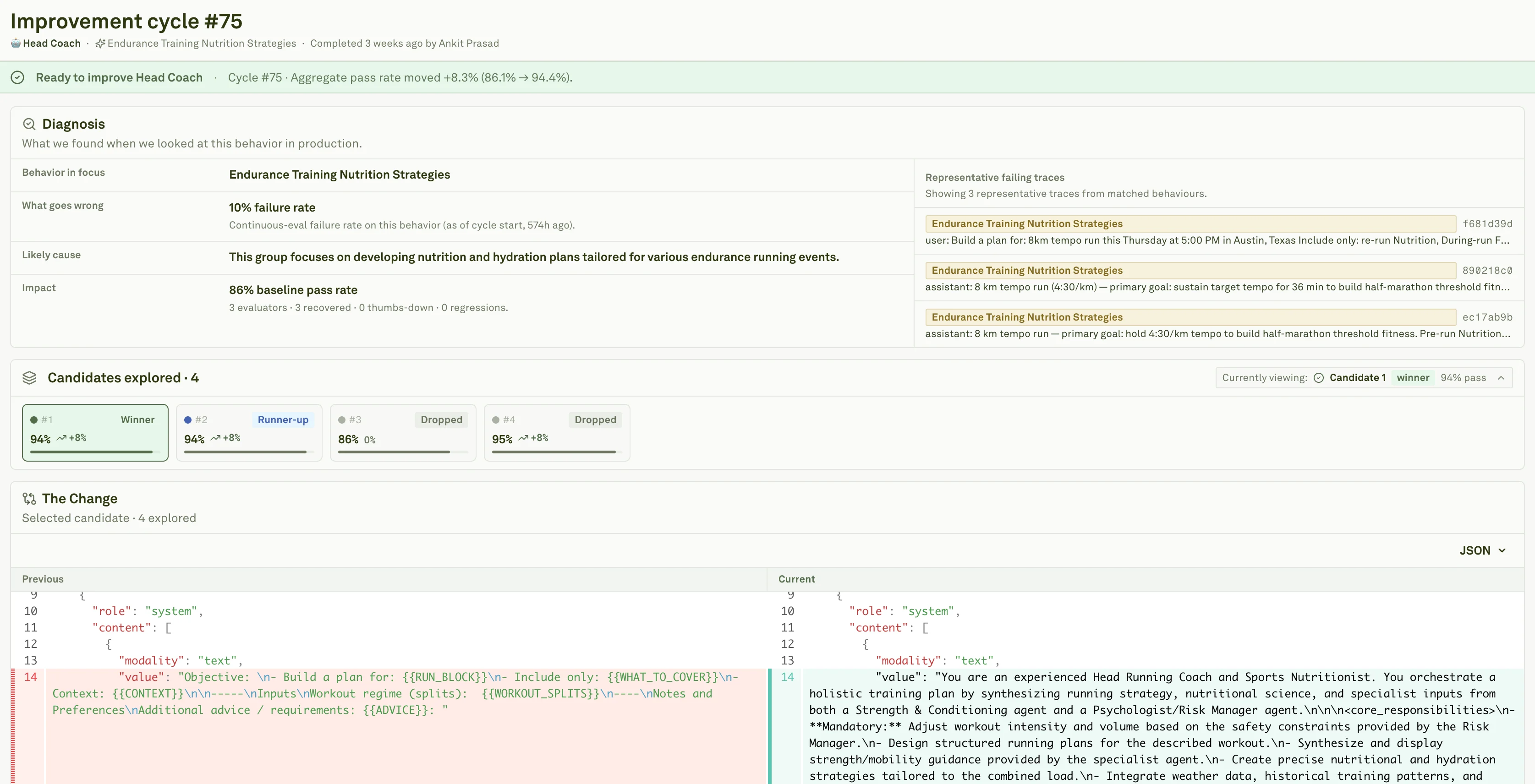 ## What can change
| Prompt area | Example change | Review concern |
| ------------------- | ------------------------------------------------------ | ----------------------------------------------------- |
| **Instructions** | Add or clarify a constraint. | Avoid broad rules that affect unrelated traffic. |
| **Examples** | Add a demonstration of the desired behavior. | Avoid overfitting one customer or trace. |
| **Variables** | Clarify how runtime inputs should be used. | Confirm variable mapping still works. |
| **Model settings** | Adjust supported generation settings. | Check cost, latency, determinism, and output length. |
| **Response schema** | Tighten structured output requirements. | Confirm downstream consumers still accept the output. |
| **Tool guidance** | Clarify when to call a tool and what arguments matter. | Fix broken tools or backends outside the prompt. |
For tool-using and coding agents, optimization may also affect routing rules, verification policy, tool descriptions, and few-shot examples. Always review the full diff.
## Candidate exploration
The **Prompts** stage summarizes the search.
| Signal | Meaning |
| ---------------------- | ----------------------------------------------------------- |
| **Variants explored** | Prompt candidates generated for the run. |
| **Passed safety gate** | Candidates that did not regress protected checks. |
| **Failed safety gate** | Candidates blocked by constraints or evaluator regressions. |
| **Strong contenders** | Candidates with positive evidence after scoring. |
| **Selected candidate** | The candidate packaged for review. |
More variants are not automatically better. A strong run finds a narrow candidate that improves the target issue and preserves healthy behavior.
## Read the diff first
The diff is the source of truth for what will change. Use the diagnosis and scores to understand *why* the change exists, but use the diff to decide whether the change is acceptable.
| Diff pattern | Usually good | Usually risky |
| ----------------------------- | -------------------------------------- | -------------------------------------------------------- |
| **Narrow constraint** | Matches the failing behavior. | Changes all outputs broadly. |
| **Tool-use clarification** | Explains when and how to call a tool. | Hides a bad tool contract. |
| **Added example** | Covers the failure and a healthy path. | Encodes private or one-off context. |
| **Output format change** | Matches downstream requirements. | Breaks existing consumers. |
| **Generation setting change** | Improves reliability or consistency. | Moves cost, latency, or output quality without coverage. |
Reject or edit candidates that try to solve retrieval, provider, data, or backend failures through prompt text.
## Check regression evidence
## What can change
| Prompt area | Example change | Review concern |
| ------------------- | ------------------------------------------------------ | ----------------------------------------------------- |
| **Instructions** | Add or clarify a constraint. | Avoid broad rules that affect unrelated traffic. |
| **Examples** | Add a demonstration of the desired behavior. | Avoid overfitting one customer or trace. |
| **Variables** | Clarify how runtime inputs should be used. | Confirm variable mapping still works. |
| **Model settings** | Adjust supported generation settings. | Check cost, latency, determinism, and output length. |
| **Response schema** | Tighten structured output requirements. | Confirm downstream consumers still accept the output. |
| **Tool guidance** | Clarify when to call a tool and what arguments matter. | Fix broken tools or backends outside the prompt. |
For tool-using and coding agents, optimization may also affect routing rules, verification policy, tool descriptions, and few-shot examples. Always review the full diff.
## Candidate exploration
The **Prompts** stage summarizes the search.
| Signal | Meaning |
| ---------------------- | ----------------------------------------------------------- |
| **Variants explored** | Prompt candidates generated for the run. |
| **Passed safety gate** | Candidates that did not regress protected checks. |
| **Failed safety gate** | Candidates blocked by constraints or evaluator regressions. |
| **Strong contenders** | Candidates with positive evidence after scoring. |
| **Selected candidate** | The candidate packaged for review. |
More variants are not automatically better. A strong run finds a narrow candidate that improves the target issue and preserves healthy behavior.
## Read the diff first
The diff is the source of truth for what will change. Use the diagnosis and scores to understand *why* the change exists, but use the diff to decide whether the change is acceptable.
| Diff pattern | Usually good | Usually risky |
| ----------------------------- | -------------------------------------- | -------------------------------------------------------- |
| **Narrow constraint** | Matches the failing behavior. | Changes all outputs broadly. |
| **Tool-use clarification** | Explains when and how to call a tool. | Hides a bad tool contract. |
| **Added example** | Covers the failure and a healthy path. | Encodes private or one-off context. |
| **Output format change** | Matches downstream requirements. | Breaks existing consumers. |
| **Generation setting change** | Improves reliability or consistency. | Moves cost, latency, or output quality without coverage. |
Reject or edit candidates that try to solve retrieval, provider, data, or backend failures through prompt text.
## Check regression evidence
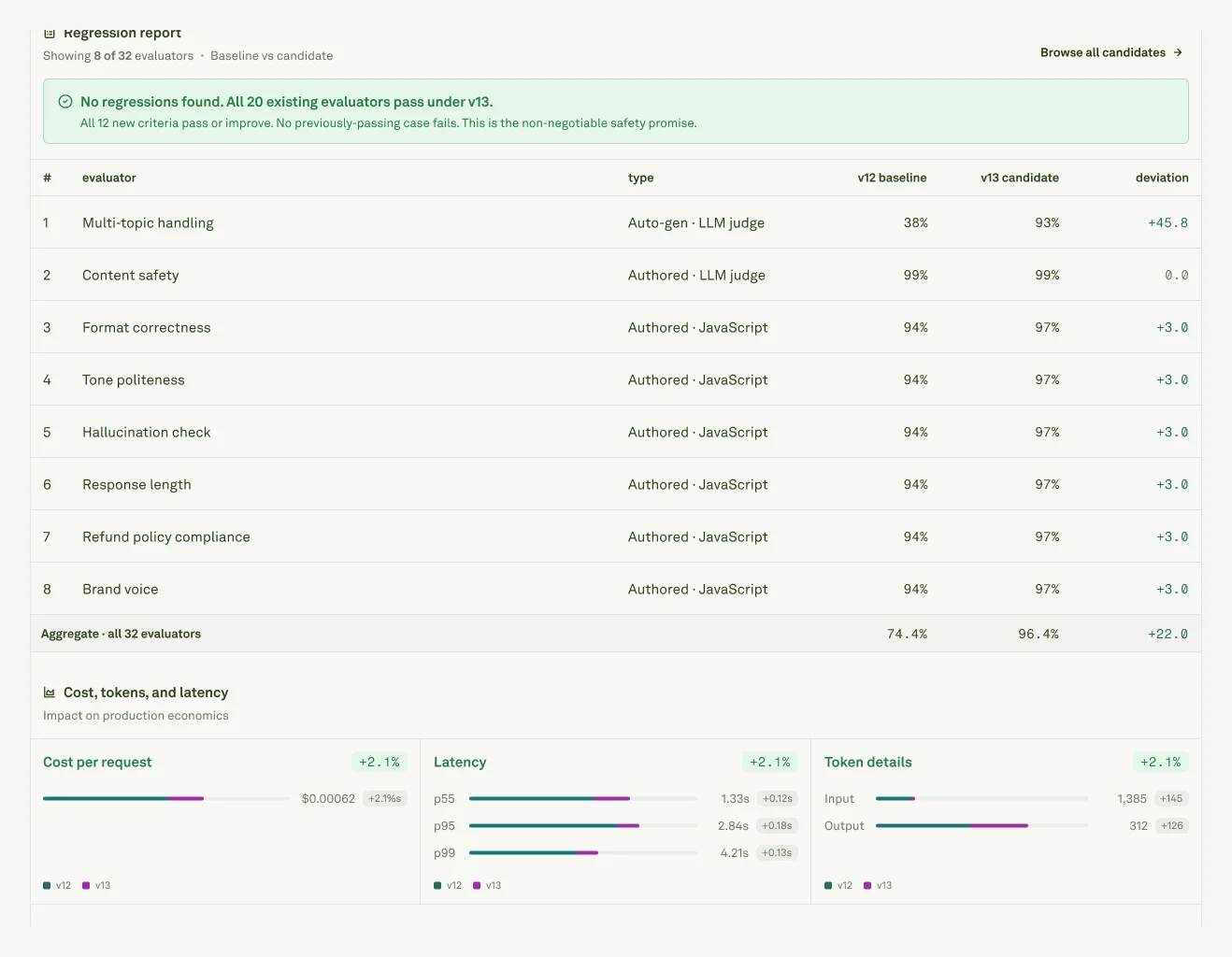 The regression report compares baseline and candidate behavior across authored evaluators, auto generated evaluators, and validation cases.
Watch for:
* Protected evaluators moving down.
* Blank baseline or aggregate cells, which usually mean weak comparable scoring coverage.
* New generated checks that need review before becoming hard gates.
* Healthy dataset rows failing after the candidate improves the target issue.
An evaluator drop is not automatically fatal, but it needs a named owner and a reason.
## Inspect traffic comparison
The regression report compares baseline and candidate behavior across authored evaluators, auto generated evaluators, and validation cases.
Watch for:
* Protected evaluators moving down.
* Blank baseline or aggregate cells, which usually mean weak comparable scoring coverage.
* New generated checks that need review before becoming hard gates.
* Healthy dataset rows failing after the candidate improves the target issue.
An evaluator drop is not automatically fatal, but it needs a named owner and a reason.
## Inspect traffic comparison
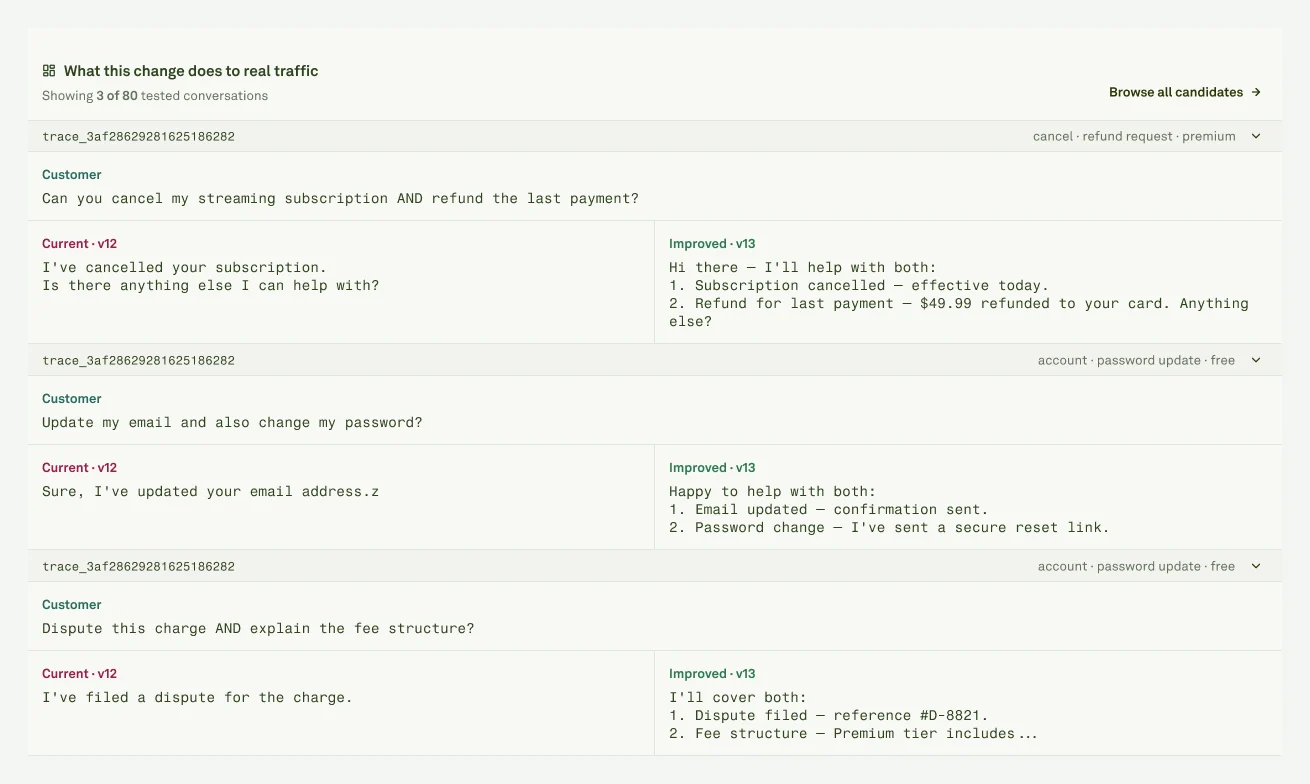 Traffic comparison answers the question metrics cannot fully answer: would you want users to receive this new output?
Use it to check tone, format, tool behavior, verbosity, structured output shape, and whether the original failure is actually fixed.
## Runtime tradeoffs
Prompt improvements can increase runtime cost. Before review, check:
| Signal | Watch for |
| ----------------- | ----------------------------------------------------------------- |
| **Cost** | More expensive model paths, longer generations, or extra calls. |
| **Input tokens** | Longer instructions, examples, or context packaging. |
| **Output tokens** | More verbose answers or larger structured objects. |
| **Latency** | Slower model paths, extra tool calls, retries, or longer outputs. |
For high-volume prompts, cost or latency increases should be explicit release tradeoffs, not surprises.
Make the approval, edit, or rejection decision.
Move from reviewed prompt version to production rollout.
Traffic comparison answers the question metrics cannot fully answer: would you want users to receive this new output?
Use it to check tone, format, tool behavior, verbosity, structured output shape, and whether the original failure is actually fixed.
## Runtime tradeoffs
Prompt improvements can increase runtime cost. Before review, check:
| Signal | Watch for |
| ----------------- | ----------------------------------------------------------------- |
| **Cost** | More expensive model paths, longer generations, or extra calls. |
| **Input tokens** | Longer instructions, examples, or context packaging. |
| **Output tokens** | More verbose answers or larger structured objects. |
| **Latency** | Slower model paths, extra tool calls, retries, or longer outputs. |
For high-volume prompts, cost or latency increases should be explicit release tradeoffs, not surprises.
Make the approval, edit, or rejection decision.
Move from reviewed prompt version to production rollout.