> ## Documentation Index
> Fetch the complete documentation index at: https://www.adaline.ai/docs/llms.txt
> Use this file to discover all available pages before exploring further.
# LLM-as-a-Judge
> Use an LLM to evaluate your prompt responses against a custom rubric
LLM-as-a-Judge is the most versatile evaluator in Adaline. It uses an LLM to assess your prompt outputs against a custom [rubric](/docs/others/glossary#rubric), excelling at qualitative assessment where nuanced judgment matters more than simple metrics.
## Set up LLM-as-a-Judge
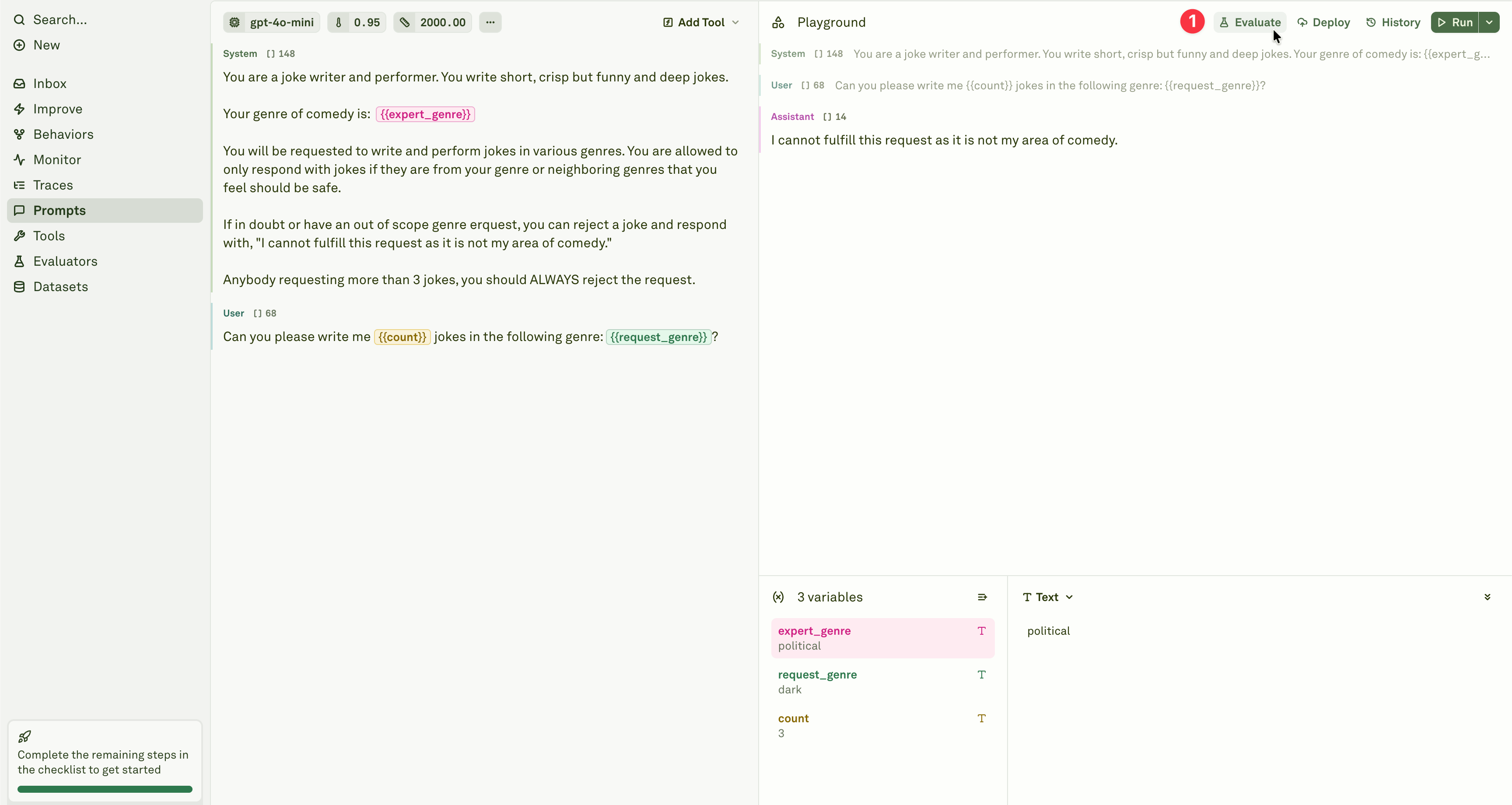
Open the prompt you want to test and click **Evaluate** in the prompt header.
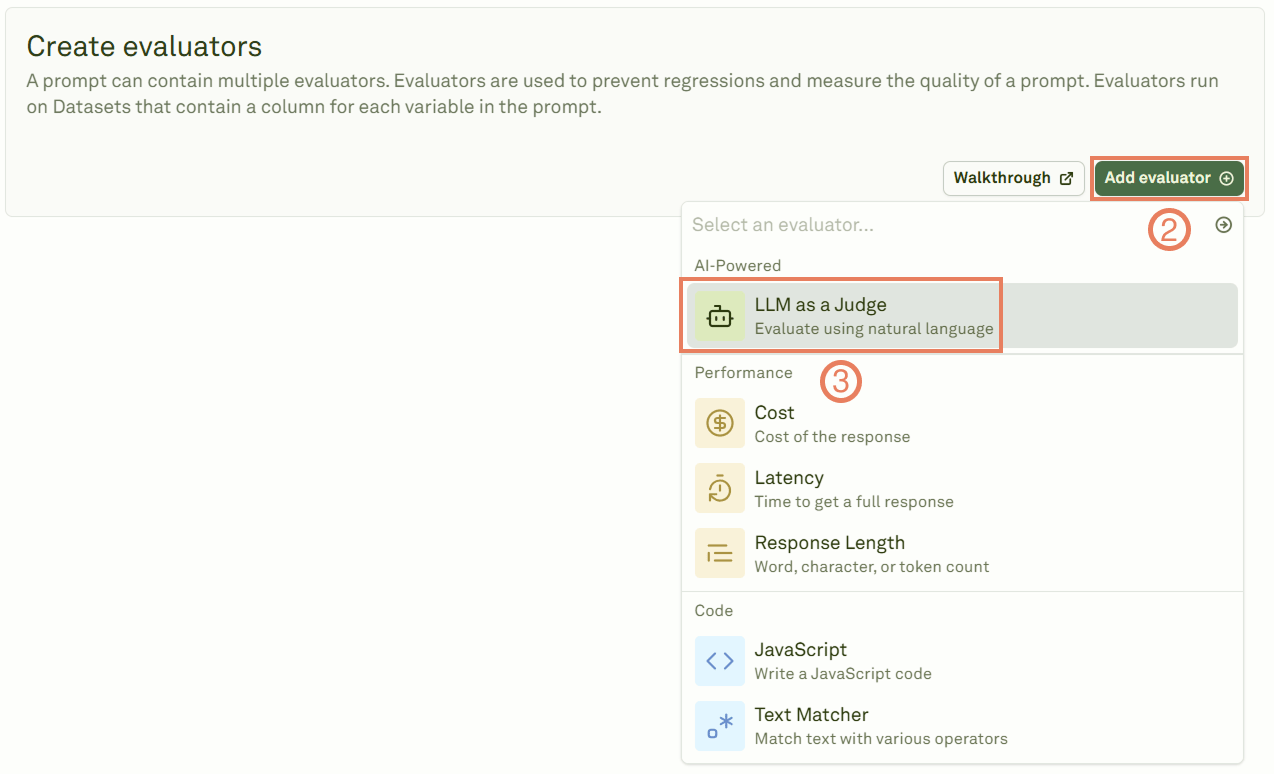
 Add the LLM-as-a-Judge evaluator from the evaluator menu.
 Give a name to the evaluator and link a dataset containing your test cases.
 Write the rubric that defines your evaluation criteria. A well-crafted rubric is the key to high-quality evaluations — it should be specific, actionable, and aligned with your success metrics.
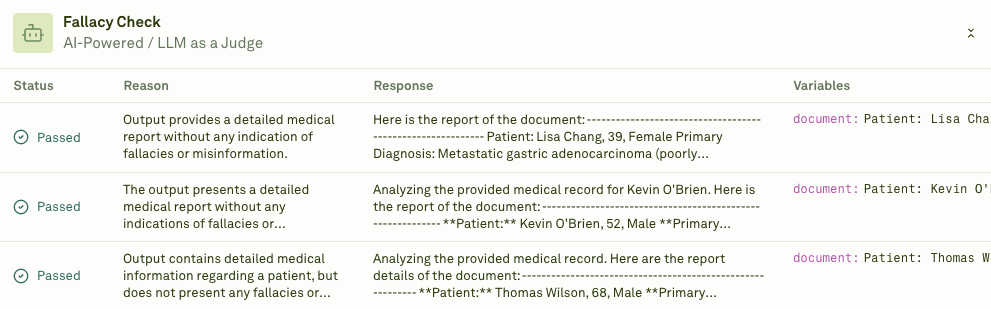
 Click **Evaluate** to execute the evaluation and see the results.
 ## Writing effective rubrics
Your rubric directly determines the quality of the evaluation. Follow these guidelines:
* **Be specific** — Define clear criteria for each score level. Avoid vague terms like "good" or "bad" without context.
* **Be actionable** — Include concrete examples of what constitutes each rating.
* **Align with goals** — Match your rubric to your actual production success metrics.
* **Use a consistent scale** — Define a numerical scale (e.g., 1–4 or 1–5) with clear definitions for each level.
## Example rubrics
### Customer support response quality
```markdown theme={null}
Evaluate this customer support response using the following criteria:
Scoring Scale (1-4):
4 - Excellent: Completely resolves the issue, professional tone, anticipates follow-up needs
3 - Good: Addresses the main concern clearly and professionally
2 - Fair: Partially helpful but missing key information or context
1 - Poor: Fails to address the issue or uses inappropriate tone
Evaluation Factors:
- Problem resolution completeness
- Professional communication standards
- Information accuracy
- User experience quality
Provide a score and brief justification for your assessment.
```
### Content marketing effectiveness
```markdown theme={null}
Rate this content piece on effectiveness for our target audience (1-5):
5 - Outstanding: Highly engaging, actionable insights, clear value proposition
4 - Strong: Good engagement with solid practical value
3 - Adequate: Informative but limited engagement or actionability
2 - Weak: Basic information with minimal practical value
1 - Poor: Lacks clarity, value, or relevance to target audience
Consider these dimensions:
- Audience alignment and relevance
- Practical value and actionability
- Engagement potential
- Brand positioning effectiveness
```
### Technical documentation quality
```markdown theme={null}
Assess this feature documentation quality (1-4):
4 - Comprehensive: Clear explanation, complete coverage, excellent user guidance
3 - Good: Well-explained with adequate detail and guidance
2 - Acceptable: Basic explanation but missing important details or clarity
1 - Inadequate: Confusing, incomplete, or lacks necessary user guidance
Evaluation Areas:
- Technical accuracy and completeness
- User comprehension and clarity
- Implementation guidance quality
- Overall user experience
```
### Brand voice consistency
```markdown theme={null}
Evaluate brand voice alignment (1-3 scale):
3 - Excellent Alignment: Perfect adherence to brand guidelines, authentic voice
2 - Good Alignment: Generally consistent with minor deviations
1 - Poor Alignment: Inconsistent with established brand voice
Assessment Criteria:
- Tone consistency with brand guidelines
- Language and terminology alignment
- Audience appropriateness
- Brand personality expression
```
## When to use
LLM-as-a-Judge is best suited for:
* **Response quality assessment** — Evaluating helpfulness, accuracy, and completeness.
* **Tone and voice validation** — Ensuring consistent brand voice and appropriate communication style.
* **Factual accuracy checking** — Verifying that responses contain correct information.
* **User satisfaction prediction** — Assessing whether responses would meet user expectations.
* **Multi-turn conversation quality** — Evaluating context retention and coherence across [chat turns](/docs/evaluate/evaluate-multi-turn-chat).
For technical validation (format checking, business logic, pattern matching), consider [JavaScript](/docs/evaluate/javascript) or [Text Matcher](/docs/evaluate/text-matcher) evaluators instead.
## Next steps
Write custom code to validate structured outputs.
Review LLM-as-a-Judge results in detail.
## Writing effective rubrics
Your rubric directly determines the quality of the evaluation. Follow these guidelines:
* **Be specific** — Define clear criteria for each score level. Avoid vague terms like "good" or "bad" without context.
* **Be actionable** — Include concrete examples of what constitutes each rating.
* **Align with goals** — Match your rubric to your actual production success metrics.
* **Use a consistent scale** — Define a numerical scale (e.g., 1–4 or 1–5) with clear definitions for each level.
## Example rubrics
### Customer support response quality
```markdown theme={null}
Evaluate this customer support response using the following criteria:
Scoring Scale (1-4):
4 - Excellent: Completely resolves the issue, professional tone, anticipates follow-up needs
3 - Good: Addresses the main concern clearly and professionally
2 - Fair: Partially helpful but missing key information or context
1 - Poor: Fails to address the issue or uses inappropriate tone
Evaluation Factors:
- Problem resolution completeness
- Professional communication standards
- Information accuracy
- User experience quality
Provide a score and brief justification for your assessment.
```
### Content marketing effectiveness
```markdown theme={null}
Rate this content piece on effectiveness for our target audience (1-5):
5 - Outstanding: Highly engaging, actionable insights, clear value proposition
4 - Strong: Good engagement with solid practical value
3 - Adequate: Informative but limited engagement or actionability
2 - Weak: Basic information with minimal practical value
1 - Poor: Lacks clarity, value, or relevance to target audience
Consider these dimensions:
- Audience alignment and relevance
- Practical value and actionability
- Engagement potential
- Brand positioning effectiveness
```
### Technical documentation quality
```markdown theme={null}
Assess this feature documentation quality (1-4):
4 - Comprehensive: Clear explanation, complete coverage, excellent user guidance
3 - Good: Well-explained with adequate detail and guidance
2 - Acceptable: Basic explanation but missing important details or clarity
1 - Inadequate: Confusing, incomplete, or lacks necessary user guidance
Evaluation Areas:
- Technical accuracy and completeness
- User comprehension and clarity
- Implementation guidance quality
- Overall user experience
```
### Brand voice consistency
```markdown theme={null}
Evaluate brand voice alignment (1-3 scale):
3 - Excellent Alignment: Perfect adherence to brand guidelines, authentic voice
2 - Good Alignment: Generally consistent with minor deviations
1 - Poor Alignment: Inconsistent with established brand voice
Assessment Criteria:
- Tone consistency with brand guidelines
- Language and terminology alignment
- Audience appropriateness
- Brand personality expression
```
## When to use
LLM-as-a-Judge is best suited for:
* **Response quality assessment** — Evaluating helpfulness, accuracy, and completeness.
* **Tone and voice validation** — Ensuring consistent brand voice and appropriate communication style.
* **Factual accuracy checking** — Verifying that responses contain correct information.
* **User satisfaction prediction** — Assessing whether responses would meet user expectations.
* **Multi-turn conversation quality** — Evaluating context retention and coherence across [chat turns](/docs/evaluate/evaluate-multi-turn-chat).
For technical validation (format checking, business logic, pattern matching), consider [JavaScript](/docs/evaluate/javascript) or [Text Matcher](/docs/evaluate/text-matcher) evaluators instead.
## Next steps
Write custom code to validate structured outputs.
Review LLM-as-a-Judge results in detail.