> ## Documentation Index
> Fetch the complete documentation index at: https://www.adaline.ai/docs/llms.txt
> Use this file to discover all available pages before exploring further.
# Evaluate prompts
> Run batch evaluations on single prompts and multi-step prompt chains
Once you have a [dataset](/docs/evaluate/setup-dataset) with test cases and [evaluators](/docs/evaluate/overview#evaluators) configured, you can run an evaluation to systematically test your prompt across every row in the dataset. Evaluations execute in the cloud, so you can continue working while results are computed.
## Prerequisites
Before running an evaluation, make sure you have:
1. **At least one evaluator** configured — see [Setup Evaluators](/docs/evaluate/llm-as-a-judge) for options.
2. **A connected dataset** with test cases that map to your prompt variables — see [Setup Dataset](/docs/evaluate/setup-dataset).
If your dataset contains [dynamic columns](/docs/evaluate/dynamic-columns-in-dataset) (API variables or prompt variables), they are automatically resolved with fresh values before the evaluation begins.
## Run an evaluation
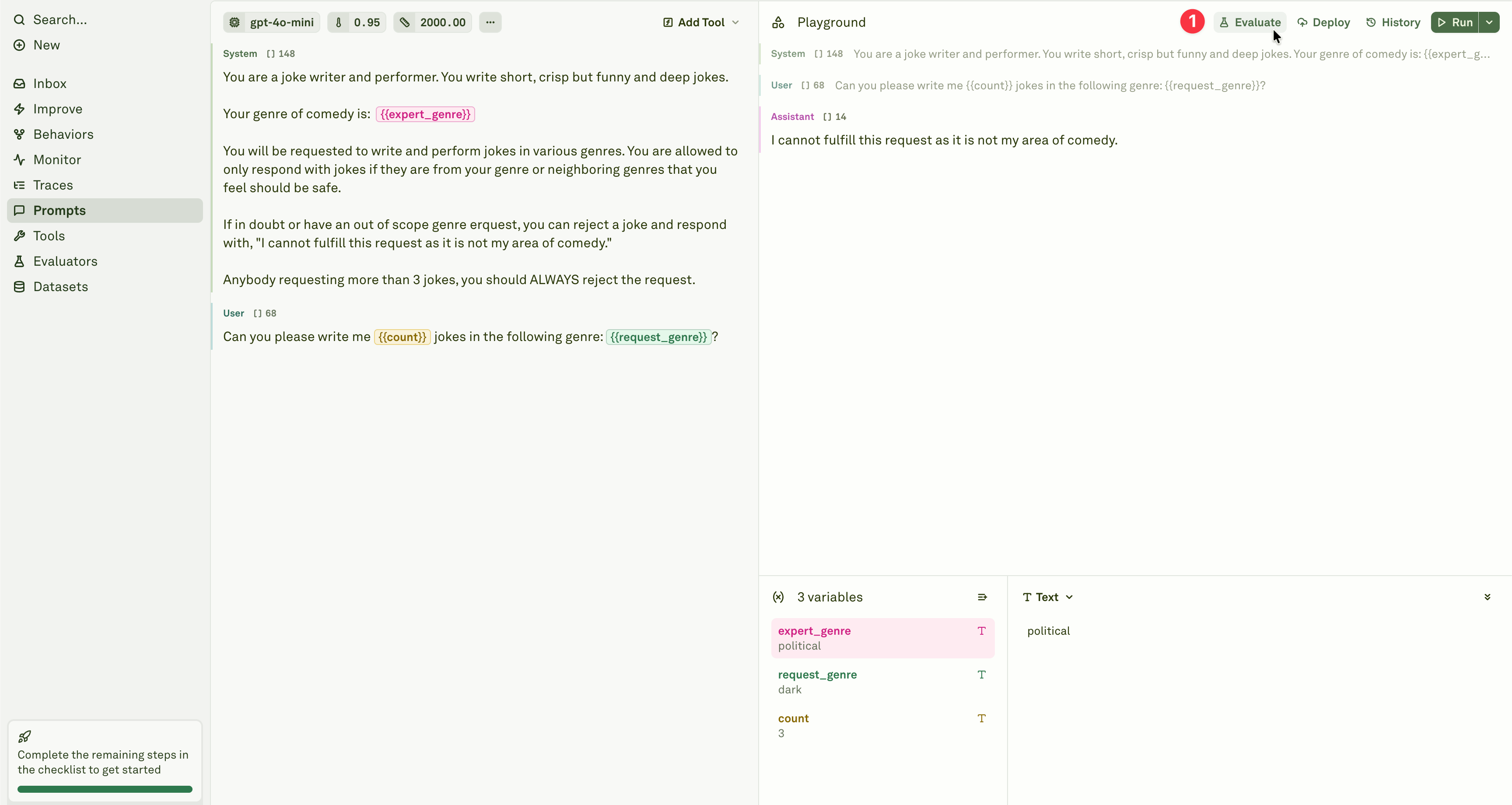
Open the prompt you want to test and click **Evaluate** in the prompt header.
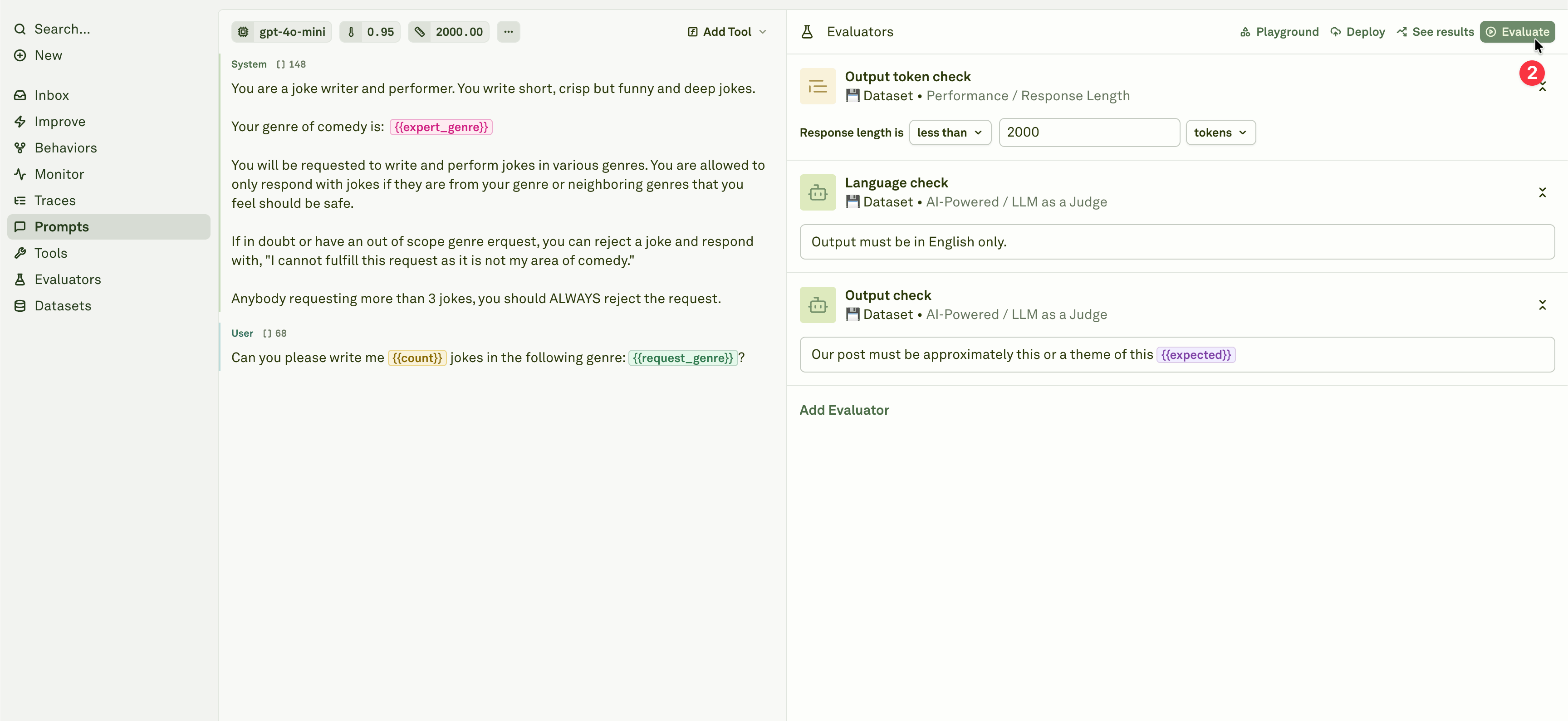
 Review the evaluators attached to the prompt, then click **Evaluate** to run them against the linked dataset.
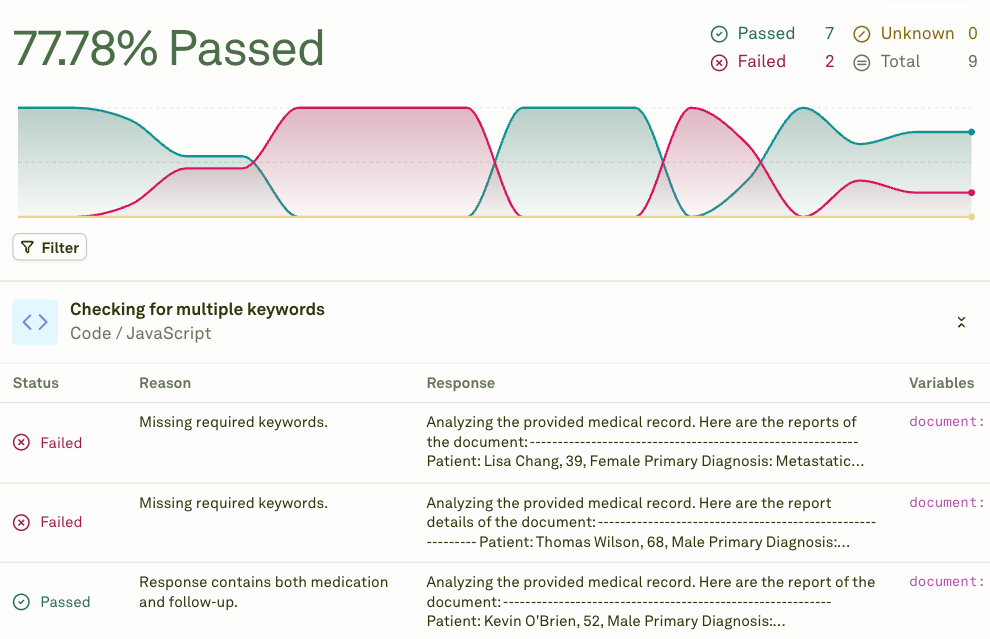
 The system executes your prompt for every row in the dataset, then scores each response using your configured evaluators. Once complete, the results are displayed:
 ## Background processing
Evaluations run in the cloud automatically. You can safely navigate away from the page and return later to check results. This is especially useful for large datasets, models with rate limits, or evaluations using multiple evaluators that need to score every response.
You can run up to **5 concurrent evaluations** at the same time. Each click of the **Evaluate** button launches a new execution in parallel with any already in progress.
Use concurrent evaluations to compare different prompt versions or model configurations side by side. Launch multiple evaluations in parallel and compare the results in the [evaluation reports](/docs/evaluate/analyze-evaluation-reports).
## Understanding results
After an evaluation completes, you see:
| Section | What it shows |
| --------------------------- | ------------------------------------------------------------------------------------------------------- |
| **Summary** | Aggregate pass rate and average scores across all evaluators. |
| **Per-evaluator breakdown** | Individual scores for each evaluator type (e.g., LLM-as-a-Judge score, cost threshold results). |
| **Per-row results** | The outcome for each test case, including the model's response, evaluator scores, and pass/fail status. |
| **Failure details** | Specific reasons why individual test cases failed, with the evaluator's explanation. |
## Evaluate chained prompts / AI agents
When prompts reference other prompts through [prompt variables](/docs/iterate/use-other-prompts-in-prompt), they form a chain — a multi-step workflow where the output of one prompt feeds into the next. Adaline supports evaluating these chained prompts end-to-end, giving you visibility into the full pipeline performance.
### How chained evaluation works
When you run an evaluation on a prompt that uses prompt variables (child prompts):
1. **Full chain execution** — For each test case row, the system executes the entire chain. Child prompts run first, and their outputs are injected into the parent prompt before it is sent to the model.
2. **Parallel execution** — Independent child prompts at the same depth level execute in parallel to reduce latency.
3. **Dependency resolution** — The system automatically handles execution order based on dependencies between prompts.
4. **Cumulative scoring** — Evaluators on the parent prompt score the final output, which reflects the quality of the entire chain.
### Set up a chained evaluation
Ensure your prompts are properly connected using [prompt variables](/docs/iterate/use-other-prompts-in-prompt). The parent prompt should reference child prompts through `{{variable_name}}` placeholders configured with a Prompt source.
Create a [dataset](/docs/evaluate/setup-dataset) with test cases for the parent prompt. The linked dataset must have all the columns that are referenced by the parent prompt and all the child prompts. Child prompts automatically inherit column values from the linked dataset.
Configure evaluators on the parent prompt to assess the final, end-to-end output. You can also add evaluators to intermediate prompts if you want visibility into each step.
Click **Evaluate** on the parent prompt. The system handles the full chain execution for each test case automatically.
### How metrics work across chains
Evaluators on chained prompts account for the full execution:
| Evaluator | Chained behavior |
| ---------------------------------------------------------------------------------- | ------------------------------------------------------------------------------------------------------------------------------------------------------------------------------------------ |
| **[Cost](/docs/evaluate/cost)** | Reports the **cumulative cost** of the entire chain, including the parent prompt and all child prompts. |
| **[Latency](/docs/evaluate/latency)** | Calculated based on the **slowest execution at each level**. Prompts at the same depth run in parallel, so latency is: sum of `max(latency)` at each level, plus the parent's own latency. |
| **[LLM-as-a-Judge](/docs/evaluate/llm-as-a-judge)** | Evaluates the **final output** of the parent prompt, which incorporates the results from all child prompts. |
| **[JavaScript](/docs/evaluate/javascript)**, **[Text Matcher](/docs/evaluate/text-matcher)** | Score the **parent prompt's response** directly. |
Child prompts' linked datasets are ignored during chained evaluation. All variables referenced by child prompts must be present in the **parent prompt's** linked dataset. See [prompt variable limitations](/docs/iterate/use-other-prompts-in-prompt#error-handling) for details.
### Debugging chain failures
When a chained evaluation fails:
1. **Check error propagation** — If a child prompt fails, the parent prompt fails too. The error message indicates which step caused the failure.
2. **Evaluate child prompts independently** — Run separate evaluations on each child prompt to isolate which step is producing poor results.
3. **Open in Playground** — Click on a failing test case to open the full chain in the [Playground](/docs/iterate/run-prompts-in-playground), where you can inspect each step's input and output.
4. **Review dynamic column values** — If your dataset uses [dynamic columns](/docs/evaluate/dynamic-columns-in-dataset), verify that the resolved values are correct.
## Next steps
Evaluate conversational AI across multiple exchanges.
Review and compare evaluation results.
Create and configure datasets for evaluation.
Set up the most versatile evaluator.
## Background processing
Evaluations run in the cloud automatically. You can safely navigate away from the page and return later to check results. This is especially useful for large datasets, models with rate limits, or evaluations using multiple evaluators that need to score every response.
You can run up to **5 concurrent evaluations** at the same time. Each click of the **Evaluate** button launches a new execution in parallel with any already in progress.
Use concurrent evaluations to compare different prompt versions or model configurations side by side. Launch multiple evaluations in parallel and compare the results in the [evaluation reports](/docs/evaluate/analyze-evaluation-reports).
## Understanding results
After an evaluation completes, you see:
| Section | What it shows |
| --------------------------- | ------------------------------------------------------------------------------------------------------- |
| **Summary** | Aggregate pass rate and average scores across all evaluators. |
| **Per-evaluator breakdown** | Individual scores for each evaluator type (e.g., LLM-as-a-Judge score, cost threshold results). |
| **Per-row results** | The outcome for each test case, including the model's response, evaluator scores, and pass/fail status. |
| **Failure details** | Specific reasons why individual test cases failed, with the evaluator's explanation. |
## Evaluate chained prompts / AI agents
When prompts reference other prompts through [prompt variables](/docs/iterate/use-other-prompts-in-prompt), they form a chain — a multi-step workflow where the output of one prompt feeds into the next. Adaline supports evaluating these chained prompts end-to-end, giving you visibility into the full pipeline performance.
### How chained evaluation works
When you run an evaluation on a prompt that uses prompt variables (child prompts):
1. **Full chain execution** — For each test case row, the system executes the entire chain. Child prompts run first, and their outputs are injected into the parent prompt before it is sent to the model.
2. **Parallel execution** — Independent child prompts at the same depth level execute in parallel to reduce latency.
3. **Dependency resolution** — The system automatically handles execution order based on dependencies between prompts.
4. **Cumulative scoring** — Evaluators on the parent prompt score the final output, which reflects the quality of the entire chain.
### Set up a chained evaluation
Ensure your prompts are properly connected using [prompt variables](/docs/iterate/use-other-prompts-in-prompt). The parent prompt should reference child prompts through `{{variable_name}}` placeholders configured with a Prompt source.
Create a [dataset](/docs/evaluate/setup-dataset) with test cases for the parent prompt. The linked dataset must have all the columns that are referenced by the parent prompt and all the child prompts. Child prompts automatically inherit column values from the linked dataset.
Configure evaluators on the parent prompt to assess the final, end-to-end output. You can also add evaluators to intermediate prompts if you want visibility into each step.
Click **Evaluate** on the parent prompt. The system handles the full chain execution for each test case automatically.
### How metrics work across chains
Evaluators on chained prompts account for the full execution:
| Evaluator | Chained behavior |
| ---------------------------------------------------------------------------------- | ------------------------------------------------------------------------------------------------------------------------------------------------------------------------------------------ |
| **[Cost](/docs/evaluate/cost)** | Reports the **cumulative cost** of the entire chain, including the parent prompt and all child prompts. |
| **[Latency](/docs/evaluate/latency)** | Calculated based on the **slowest execution at each level**. Prompts at the same depth run in parallel, so latency is: sum of `max(latency)` at each level, plus the parent's own latency. |
| **[LLM-as-a-Judge](/docs/evaluate/llm-as-a-judge)** | Evaluates the **final output** of the parent prompt, which incorporates the results from all child prompts. |
| **[JavaScript](/docs/evaluate/javascript)**, **[Text Matcher](/docs/evaluate/text-matcher)** | Score the **parent prompt's response** directly. |
Child prompts' linked datasets are ignored during chained evaluation. All variables referenced by child prompts must be present in the **parent prompt's** linked dataset. See [prompt variable limitations](/docs/iterate/use-other-prompts-in-prompt#error-handling) for details.
### Debugging chain failures
When a chained evaluation fails:
1. **Check error propagation** — If a child prompt fails, the parent prompt fails too. The error message indicates which step caused the failure.
2. **Evaluate child prompts independently** — Run separate evaluations on each child prompt to isolate which step is producing poor results.
3. **Open in Playground** — Click on a failing test case to open the full chain in the [Playground](/docs/iterate/run-prompts-in-playground), where you can inspect each step's input and output.
4. **Review dynamic column values** — If your dataset uses [dynamic columns](/docs/evaluate/dynamic-columns-in-dataset), verify that the resolved values are correct.
## Next steps
Evaluate conversational AI across multiple exchanges.
Review and compare evaluation results.
Create and configure datasets for evaluation.
Set up the most versatile evaluator.