> ## Documentation Index
> Fetch the complete documentation index at: https://www.adaline.ai/docs/llms.txt
> Use this file to discover all available pages before exploring further.
# Coding-agent Behaviors
> Understand coding-agent task patterns, triage findings, trajectories, phases, and source evidence
Coding-agent Behaviors are patterns Adaline finds across agent task runs. They are useful when you want to understand how a coding agent works over time: where it verifies changes, gets stuck, loops, skips tests, recovers from errors, or follows a healthy edit-and-check path.
Use this page for logs coming from OpenCode or similar coding agents. For the general Behavior catalog workflow, see [Understanding Behaviors](/behaviors/understanding-behaviors).
## Before Behaviors appear
Coding-agent projects need enough structured evidence for Adaline to understand the task path, not only the final answer. In addition to normal log traces and spans, send a stable task or run identifier, agent metadata, phase-like spans, outcomes, and safe summaries of important tool or command results.
Some coding-agent projects may also require project enablement or a specific coding-agent tag/metadata convention before the coding-agent views are populated. If you are setting this up for the first time, contact [support@adaline.ai](mailto:support@adaline.ai) or use the metadata your Adaline team provides.
At a minimum, useful coding-agent logs should include:
* One trace or run boundary for the coding task.
* A stable session, task, or run ID when the task spans multiple traces.
* Agent name or type, workflow, repository or project category, language, framework, and environment when safe to send.
* Spans for planning, search, file reads, edits, tool calls, command runs, tests, recovery, and final handoff.
* Outcome/status, such as success, failed, partial, blocked, or needs review.
## Read the coding-agent catalog
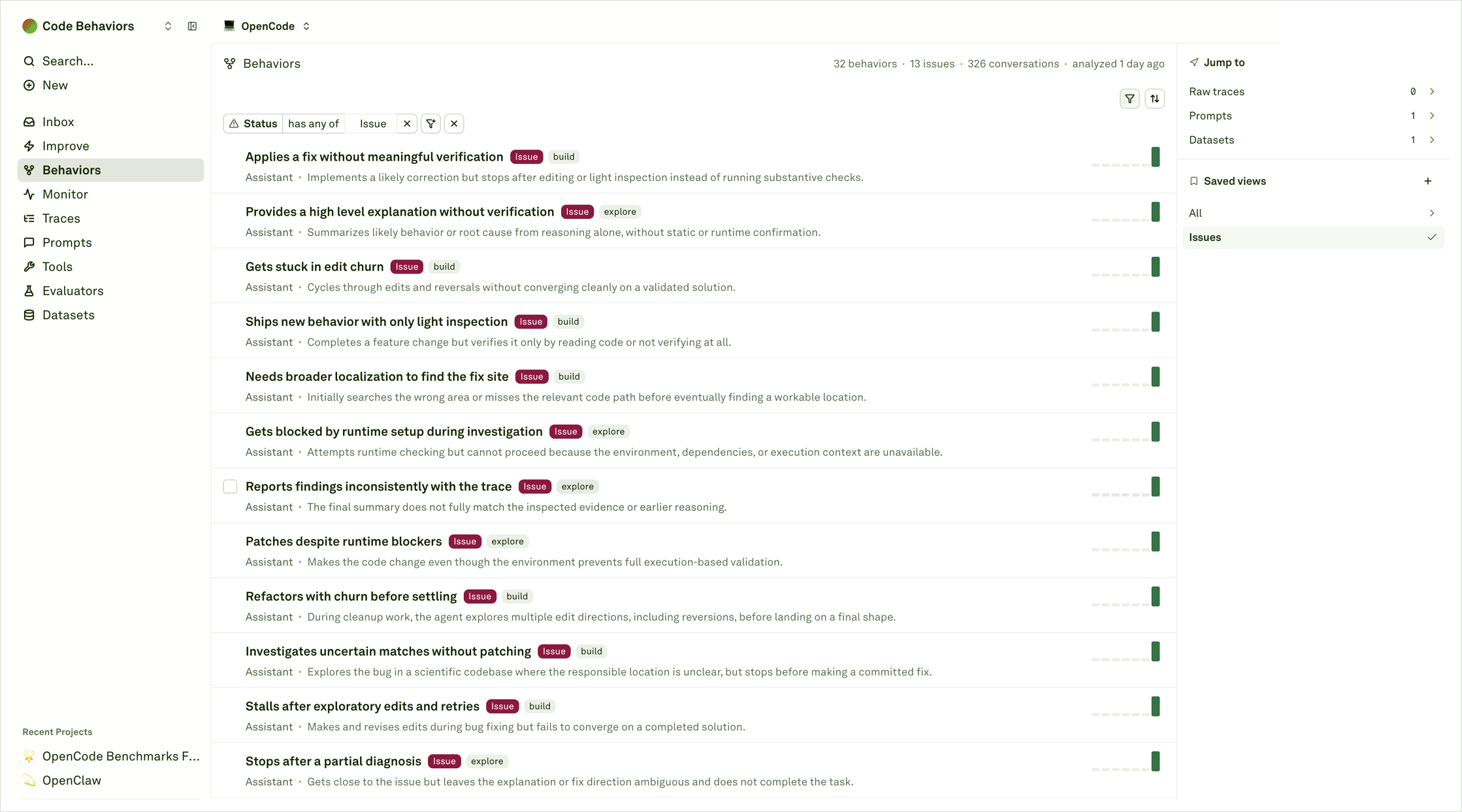 The catalog works like the general Behaviors view, but the rows are about coding-agent task patterns. A row might describe skipped verification, edit churn, runtime blockers, inconsistent summaries, repeated exploration, or healthy task completion.
Read the row name, short summary, role, issue tag, workflow tag, represented evidence, and related objects. The row tells you what Adaline is seeing repeatedly; it is not enough by itself to change an agent prompt, tool policy, repo indexing, or command wrapper. Open the Behavior to read the triage and examples.
Saved views are helpful for recurring reviews, such as issue-only coding-agent review, build-flow review, exploration-flow review, or verification-quality review.
## Inspect triage findings
The catalog works like the general Behaviors view, but the rows are about coding-agent task patterns. A row might describe skipped verification, edit churn, runtime blockers, inconsistent summaries, repeated exploration, or healthy task completion.
Read the row name, short summary, role, issue tag, workflow tag, represented evidence, and related objects. The row tells you what Adaline is seeing repeatedly; it is not enough by itself to change an agent prompt, tool policy, repo indexing, or command wrapper. Open the Behavior to read the triage and examples.
Saved views are helpful for recurring reviews, such as issue-only coding-agent review, build-flow review, exploration-flow review, or verification-quality review.
## Inspect triage findings
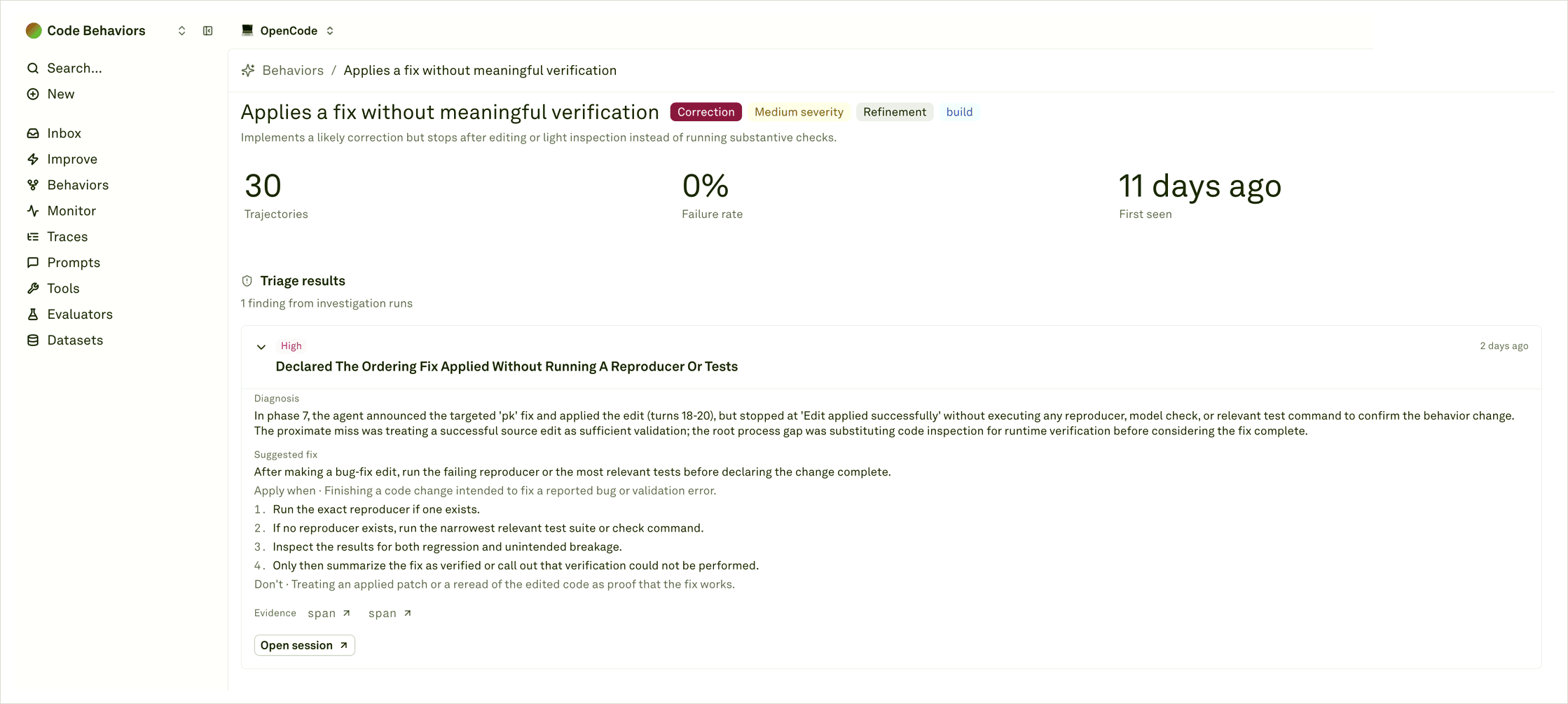 Triage findings explain why the pattern was flagged and what Adaline thinks happened. For coding agents, a triage result may call out the root process gap: for example, the agent applied a fix but did not run a reproducer, treated code inspection as verification, retried the same command without learning, or summarized a result that did not match the trace.
Read the diagnosis next to the suggested fix and evidence links. Evidence links should take you back to exact spans, commands, model calls, or tool results. When available, use **Open session** to inspect the larger task journey.
Good triage should help you decide whether the fix belongs in:
* The coding-agent prompt or workflow instructions.
* Verification policy, tests, command wrappers, or stopping criteria.
* Tooling, repository search, indexing, retrieval, or environment setup.
* Evaluation criteria or dataset coverage for future releases.
## Use Sessions for task runs
Triage findings explain why the pattern was flagged and what Adaline thinks happened. For coding agents, a triage result may call out the root process gap: for example, the agent applied a fix but did not run a reproducer, treated code inspection as verification, retried the same command without learning, or summarized a result that did not match the trace.
Read the diagnosis next to the suggested fix and evidence links. Evidence links should take you back to exact spans, commands, model calls, or tool results. When available, use **Open session** to inspect the larger task journey.
Good triage should help you decide whether the fix belongs in:
* The coding-agent prompt or workflow instructions.
* Verification policy, tests, command wrappers, or stopping criteria.
* Tooling, repository search, indexing, retrieval, or environment setup.
* Evaluation criteria or dataset coverage for future releases.
## Use Sessions for task runs
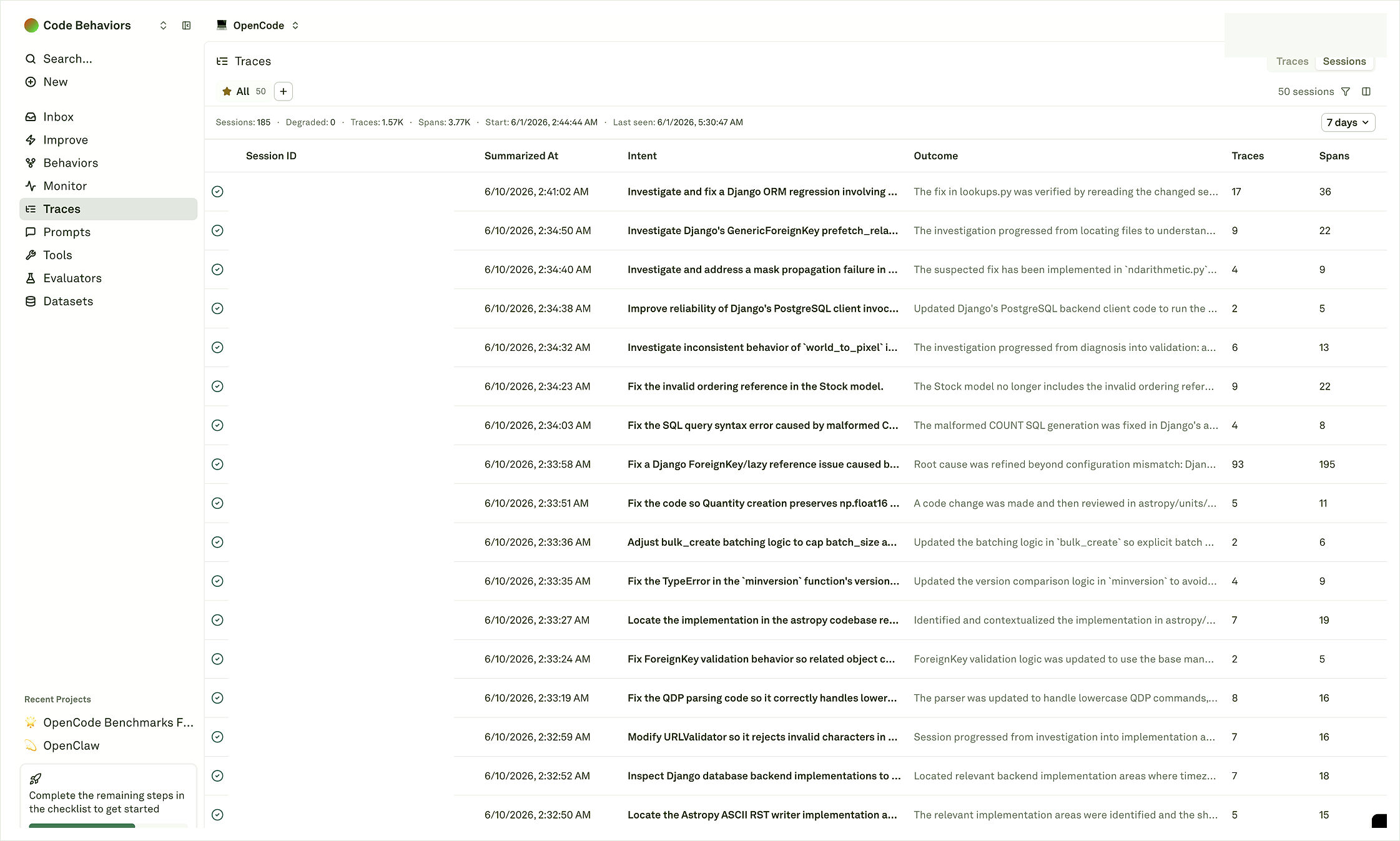 The **Sessions** tab is useful when you want to start from task runs instead of a Behavior. Each row summarizes a coding-agent journey with its intent, outcome, trace count, and span count. Use this view to find representative successful, failed, partial, or unusually large runs before opening the full journey.
The trace and span counts matter because coding-agent work is rarely a single call. A short task may only have a few spans; a hard investigation can include many tool calls, file reads, edits, retries, and verification steps. Open the session when the row suggests enough evidence to explain the behavior.
## Review trajectories and phases
The **Sessions** tab is useful when you want to start from task runs instead of a Behavior. Each row summarizes a coding-agent journey with its intent, outcome, trace count, and span count. Use this view to find representative successful, failed, partial, or unusually large runs before opening the full journey.
The trace and span counts matter because coding-agent work is rarely a single call. A short task may only have a few spans; a hard investigation can include many tool calls, file reads, edits, retries, and verification steps. Open the session when the row suggests enough evidence to explain the behavior.
## Review trajectories and phases
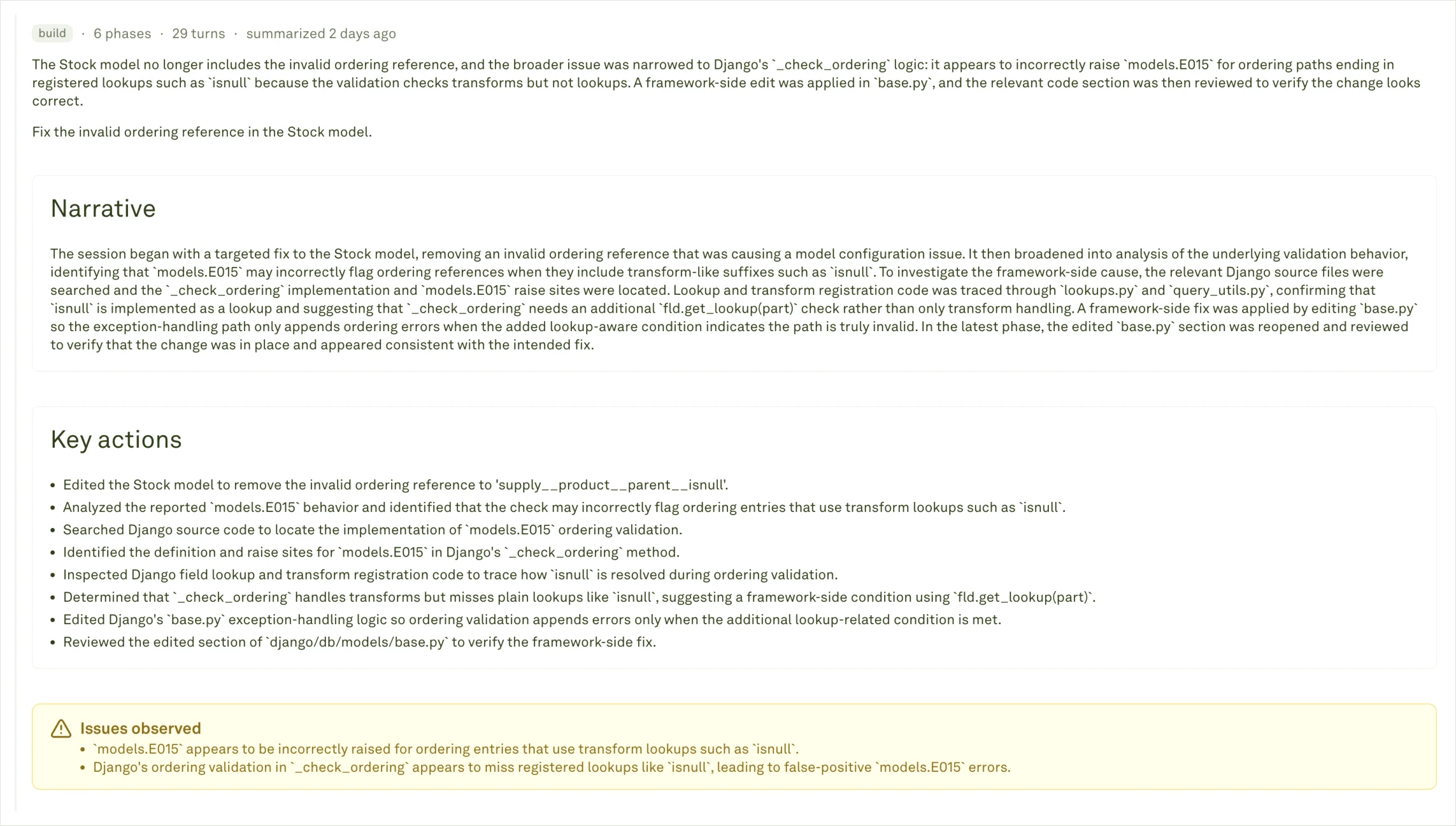 Member trajectories are representative task runs that contributed to the Behavior. They help you see whether the pattern is consistent across tasks or caused by one noisy example. You can open them from a Behavior detail page, or start from **Traces** and switch to the **Sessions** tab when you want to inspect coding-agent journeys directly.
An opened trajectory shows a narrative, key actions, issues observed, phase count, turn count, and completion status. Use that summary before going span-by-span.
Member trajectories are representative task runs that contributed to the Behavior. They help you see whether the pattern is consistent across tasks or caused by one noisy example. You can open them from a Behavior detail page, or start from **Traces** and switch to the **Sessions** tab when you want to inspect coding-agent journeys directly.
An opened trajectory shows a narrative, key actions, issues observed, phase count, turn count, and completion status. Use that summary before going span-by-span.
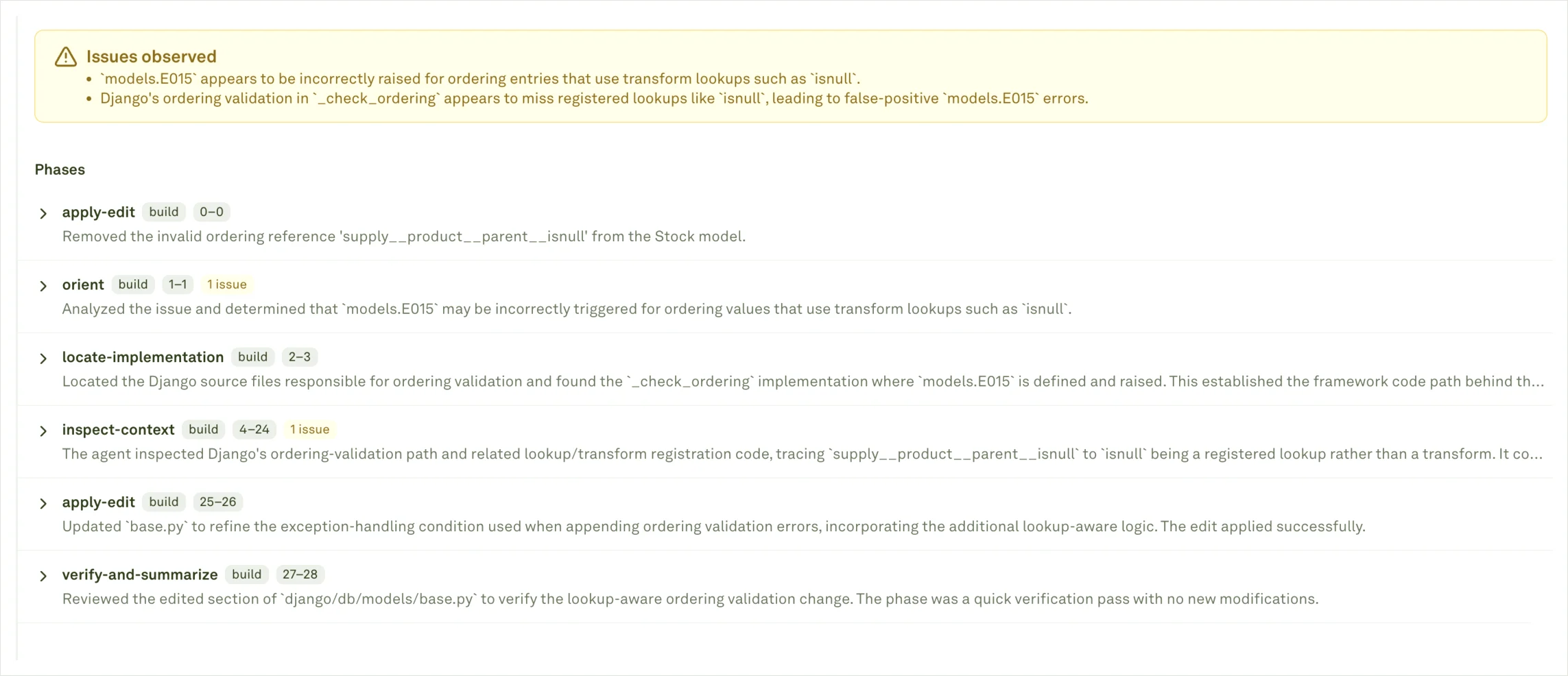 When you open a trajectory or session, read it as a journey:
| Journey part | What to look for |
| ------------------- | --------------------------------------------------------------------------------------- |
| **Task / intent** | What the user or benchmark asked the agent to do. |
| **Outcome** | Whether the run succeeded, failed, got blocked, or only partially completed. |
| **Phases** | Planning, searching, editing, testing, recovery, and handoff. |
| **Key actions** | Important edits, tool calls, command runs, or investigation steps. |
| **Issues observed** | The specific failure mechanism Adaline detected. |
| **Source spans** | Exact commands, model calls, tool results, errors, and summaries behind the trajectory. |
Phases are especially useful for coding agents because the final answer can look acceptable while the path was fragile. A run that passed may still skip meaningful verification; a failed run may still provide useful examples for datasets, evaluators, or workflow instructions.
## Common coding-agent patterns
| Pattern | What it may mean | Evidence to inspect |
| ------------------------------------------------- | ------------------------------------------------------------------------------------ | ------------------------------------------------------------------ |
| **Applies a fix without meaningful verification** | The agent edits code but stops before running a reproducer, test, or relevant check. | Edit spans, command spans, final answer, triage suggested fix. |
| **Gets stuck in edit churn** | The agent cycles through edits, reversals, or repeated searches without converging. | Phase summaries, file-read spans, repeated command attempts. |
| **Runtime setup blocks investigation** | The environment, dependencies, or command context prevents validation. | Command output summaries, environment metadata, recovery attempts. |
| **Reports findings inconsistently** | The final summary does not match earlier evidence. | Reasoning trace, inspected spans, final handoff. |
| **Healthy edit-and-check flow** | The agent follows a useful pattern worth preserving. | Successful trajectories, tests run, source spans, outcome labels. |
Your actual labels depend on the evidence in the project. Use the labels as entry points, then rely on triage and trajectories for decisions.
## Choose the next action
| What you learn | Good next action |
| ---------------------------------------------------------- | ------------------------------------------------------------------------------------------------- |
| The agent had enough context but chose the wrong strategy. | Update the agent prompt or workflow instructions; use Improve if the prompt is stored in Adaline. |
| The agent skipped verification after editing. | Add verification instructions, evaluator coverage, or command/tool policy. |
| The agent could not find the right files or symbols. | Improve repo search, indexing, retrieval, or task context. |
| The agent failed because the runtime was broken. | Fix the environment, command wrapper, dependency setup, or CI path before changing prompts. |
| The pattern is healthy and repeated. | Preserve it with datasets, evaluator checks, or release review examples. |
Read the journey model behind coding-agent Behavior evidence.
Send the logs and metadata that make Behavior maps useful.
Review the general catalog and detail workflow.
Turn prompt-addressable coding-agent patterns into reviewed cycles.
When you open a trajectory or session, read it as a journey:
| Journey part | What to look for |
| ------------------- | --------------------------------------------------------------------------------------- |
| **Task / intent** | What the user or benchmark asked the agent to do. |
| **Outcome** | Whether the run succeeded, failed, got blocked, or only partially completed. |
| **Phases** | Planning, searching, editing, testing, recovery, and handoff. |
| **Key actions** | Important edits, tool calls, command runs, or investigation steps. |
| **Issues observed** | The specific failure mechanism Adaline detected. |
| **Source spans** | Exact commands, model calls, tool results, errors, and summaries behind the trajectory. |
Phases are especially useful for coding agents because the final answer can look acceptable while the path was fragile. A run that passed may still skip meaningful verification; a failed run may still provide useful examples for datasets, evaluators, or workflow instructions.
## Common coding-agent patterns
| Pattern | What it may mean | Evidence to inspect |
| ------------------------------------------------- | ------------------------------------------------------------------------------------ | ------------------------------------------------------------------ |
| **Applies a fix without meaningful verification** | The agent edits code but stops before running a reproducer, test, or relevant check. | Edit spans, command spans, final answer, triage suggested fix. |
| **Gets stuck in edit churn** | The agent cycles through edits, reversals, or repeated searches without converging. | Phase summaries, file-read spans, repeated command attempts. |
| **Runtime setup blocks investigation** | The environment, dependencies, or command context prevents validation. | Command output summaries, environment metadata, recovery attempts. |
| **Reports findings inconsistently** | The final summary does not match earlier evidence. | Reasoning trace, inspected spans, final handoff. |
| **Healthy edit-and-check flow** | The agent follows a useful pattern worth preserving. | Successful trajectories, tests run, source spans, outcome labels. |
Your actual labels depend on the evidence in the project. Use the labels as entry points, then rely on triage and trajectories for decisions.
## Choose the next action
| What you learn | Good next action |
| ---------------------------------------------------------- | ------------------------------------------------------------------------------------------------- |
| The agent had enough context but chose the wrong strategy. | Update the agent prompt or workflow instructions; use Improve if the prompt is stored in Adaline. |
| The agent skipped verification after editing. | Add verification instructions, evaluator coverage, or command/tool policy. |
| The agent could not find the right files or symbols. | Improve repo search, indexing, retrieval, or task context. |
| The agent failed because the runtime was broken. | Fix the environment, command wrapper, dependency setup, or CI path before changing prompts. |
| The pattern is healthy and repeated. | Preserve it with datasets, evaluator checks, or release review examples. |
Read the journey model behind coding-agent Behavior evidence.
Send the logs and metadata that make Behavior maps useful.
Review the general catalog and detail workflow.
Turn prompt-addressable coding-agent patterns into reviewed cycles.