> ## Documentation Index
> Fetch the complete documentation index at: https://www.adaline.ai/docs/llms.txt
> Use this file to discover all available pages before exploring further.
# Data management
> Export, retain, and delete data across your Adaline workspace
Adaline gives you control over the data your team creates and the telemetry your applications generate. This page covers how to export project data, manage retention, and request data deletion.
Data management matters because self-improvement depends on production evidence. Keep the traces, datasets, evaluator results, and deployment history your team needs for review, and remove or redact data your policy does not allow.
## Data export
### Project export
You can export individual projects from the Adaline Dashboard. A project export produces a JSON file containing the project's prompts, datasets (structure and rows), evaluators, variables, tools, and deployment environment configuration.
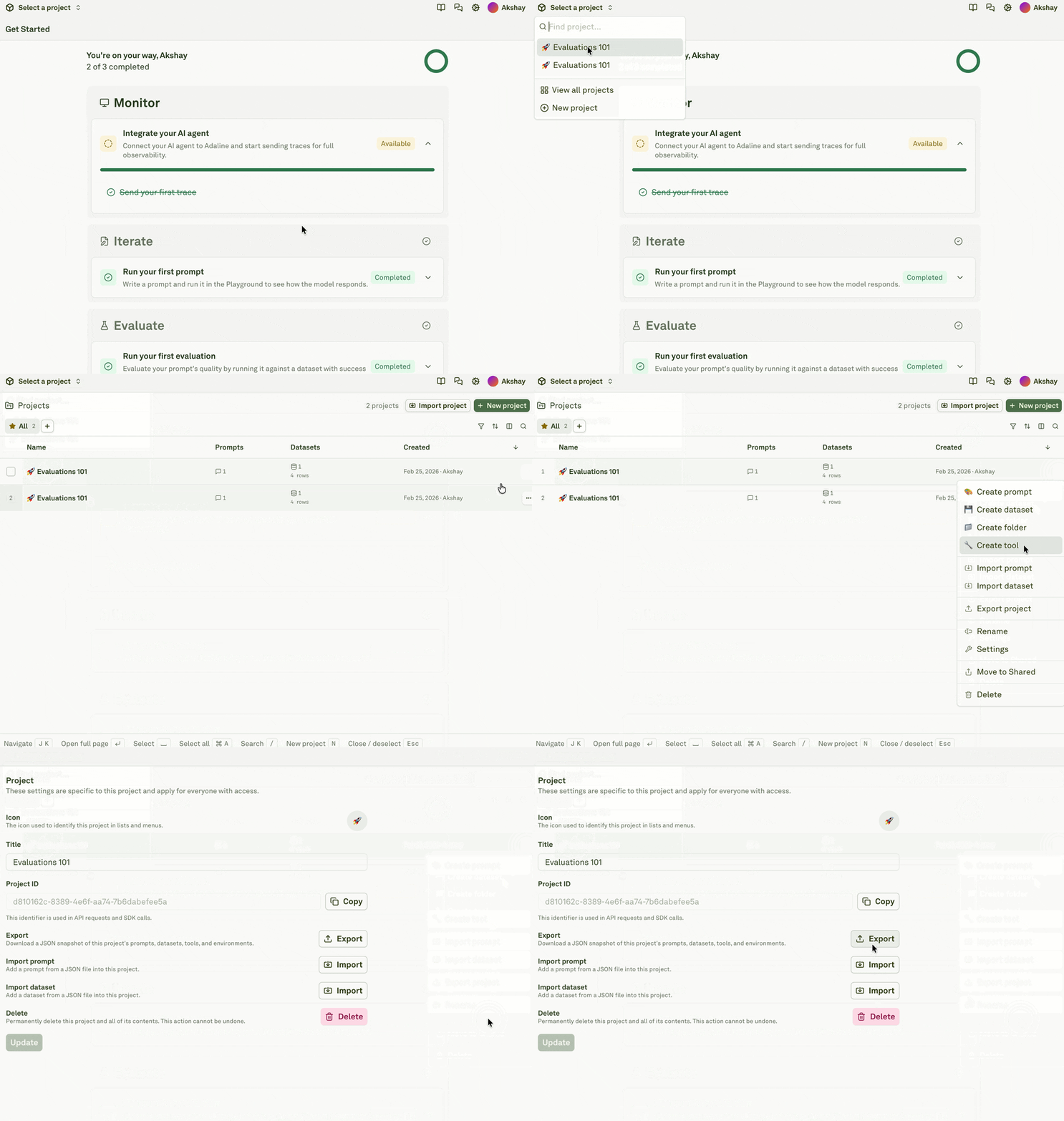 Project exports are useful for backing up your work, migrating configurations between workspaces, sharing project templates with teammates, or seeding new environments. The same JSON format is accepted by **Import Project** to recreate the full project in any workspace.
Project exports include configuration and dataset content but do not include log data. To export logs, contact [support@adaline.ai](mailto:support@adaline.ai).
### Workspace-level export
Currently there is no self-service workspace-level export feature available. You can use the [Adaline API](/docs/reference/introduction) to programmatically list and retrieve projects, prompts, datasets, etc. or contact [support@adaline.ai](mailto:support@adaline.ai).
## Data retention
Adaline retains your data according to your plan's retention policy. Retention periods vary by billing plans. Retention applies to all data stored in the platform, including:
* **Production logs** — traces, spans, and their associated inputs, outputs, and metadata
* **Project configurations** — prompts, datasets, evaluators, and deployment environments
* **Evaluation results** — scores, evaluator outputs, and run history
* **Audit logs** — authentication events, resource operations, and configuration changes
When data reaches the end of its retention window, it is automatically and permanently deleted from Adaline's storage systems.
## Production data hygiene
Before sending data into Adaline:
* Decide which traces, spans, tags, attributes, and payloads are allowed.
* Avoid sending API keys, access tokens, secrets, and raw credentials.
* Prefer stable internal labels over raw personal identifiers.
* Keep sensitive source-system IDs out of screenshots and docs.
* Mark production-derived dataset rows clearly so reviewers understand their source.
* Use your organization's policy for user content, tenant metadata, and retention.
When exporting projects or logs, treat the export as sensitive. Store it in approved locations and share it only with people who should see the underlying project configuration or production evidence.
## Data deletion
### Project deletion
Deleting a project in Adaline permanently deletes all of the project's resources — folders, prompts, datasets, evaluators, evaluations runs, deployments, environments, logs, etc. This action cannot be undone.
### Workspace-level deletion
Currently there is no self-service workspace-level deletion feature available. You must contact [support@adaline.ai](mailto:support@adaline.ai) to request workspace deletion.
## Before deleting a project
Confirm:
* Production applications no longer read deployments from the project.
* API keys and automation no longer write traces to the project.
* Webhooks or CI/CD jobs no longer depend on its deployment events.
* Regression datasets and evaluators have been migrated if they are still useful.
* Prompt versions and deployment history have been exported if your team needs an audit record.
Project exports are useful for backing up your work, migrating configurations between workspaces, sharing project templates with teammates, or seeding new environments. The same JSON format is accepted by **Import Project** to recreate the full project in any workspace.
Project exports include configuration and dataset content but do not include log data. To export logs, contact [support@adaline.ai](mailto:support@adaline.ai).
### Workspace-level export
Currently there is no self-service workspace-level export feature available. You can use the [Adaline API](/docs/reference/introduction) to programmatically list and retrieve projects, prompts, datasets, etc. or contact [support@adaline.ai](mailto:support@adaline.ai).
## Data retention
Adaline retains your data according to your plan's retention policy. Retention periods vary by billing plans. Retention applies to all data stored in the platform, including:
* **Production logs** — traces, spans, and their associated inputs, outputs, and metadata
* **Project configurations** — prompts, datasets, evaluators, and deployment environments
* **Evaluation results** — scores, evaluator outputs, and run history
* **Audit logs** — authentication events, resource operations, and configuration changes
When data reaches the end of its retention window, it is automatically and permanently deleted from Adaline's storage systems.
## Production data hygiene
Before sending data into Adaline:
* Decide which traces, spans, tags, attributes, and payloads are allowed.
* Avoid sending API keys, access tokens, secrets, and raw credentials.
* Prefer stable internal labels over raw personal identifiers.
* Keep sensitive source-system IDs out of screenshots and docs.
* Mark production-derived dataset rows clearly so reviewers understand their source.
* Use your organization's policy for user content, tenant metadata, and retention.
When exporting projects or logs, treat the export as sensitive. Store it in approved locations and share it only with people who should see the underlying project configuration or production evidence.
## Data deletion
### Project deletion
Deleting a project in Adaline permanently deletes all of the project's resources — folders, prompts, datasets, evaluators, evaluations runs, deployments, environments, logs, etc. This action cannot be undone.
### Workspace-level deletion
Currently there is no self-service workspace-level deletion feature available. You must contact [support@adaline.ai](mailto:support@adaline.ai) to request workspace deletion.
## Before deleting a project
Confirm:
* Production applications no longer read deployments from the project.
* API keys and automation no longer write traces to the project.
* Webhooks or CI/CD jobs no longer depend on its deployment events.
* Regression datasets and evaluators have been migrated if they are still useful.
* Prompt versions and deployment history have been exported if your team needs an audit record.