> ## Documentation Index
> Fetch the complete documentation index at: https://www.adaline.ai/docs/llms.txt
> Use this file to discover all available pages before exploring further.
# Create API keys
> Create workspace API keys for SDK, API, proxy, logging, evaluation, and deployment workflows
API keys authenticate applications and automation that call Adaline. Use them for SDKs, APIs, logging, prompt access, evaluation workflows, and deployment automation.
Keys are the runtime connection into the improvement loop. Name and scope them so your team can tell which service sends traces, reads deployments, runs evaluations, or powers automation.
 ## Create a key
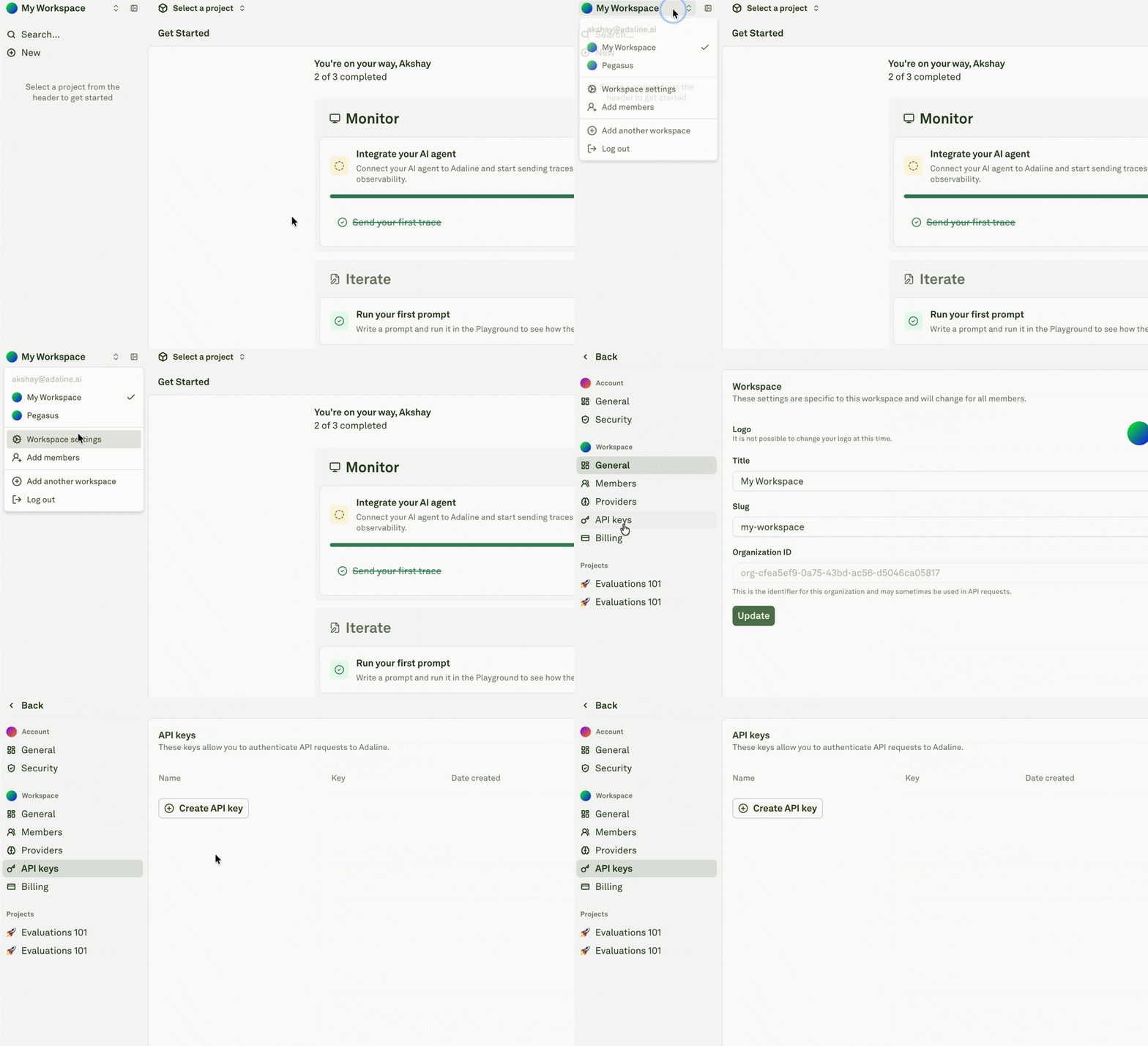
Open the workspace menu, then go to **Workspace** settings.
Select **API keys** from the settings navigation.
Click **Create API key** and give the key a name that describes the application, service, or automation that will use it.
Copy the key immediately and store it in your secret manager. Adaline does not show the full key again after creation.
Treat API keys like production secrets. Do not paste them into prompts, traces, screenshots, docs, tickets, or client-side code.
## Use a key in the SDK
```typescript theme={null}
import { Adaline } from "@adaline/sdk";
const adaline = new Adaline({
apiKey: process.env.ADALINE_API_KEY
});
```
## Use a key in API requests
```bash theme={null}
curl -H "Authorization: Bearer $ADALINE_API_KEY" \
https://api.adaline.ai/v2/prompts
```
## Key hygiene
* Use one key per application or automation.
* Rotate keys when people leave a project or a secret may have been exposed.
* Delete unused keys.
* Keep production and development keys separate.
* Review key ownership and rotate keys when the service, environment, or owner changes.
## Create a key
Open the workspace menu, then go to **Workspace** settings.
Select **API keys** from the settings navigation.
Click **Create API key** and give the key a name that describes the application, service, or automation that will use it.
Copy the key immediately and store it in your secret manager. Adaline does not show the full key again after creation.
Treat API keys like production secrets. Do not paste them into prompts, traces, screenshots, docs, tickets, or client-side code.
## Use a key in the SDK
```typescript theme={null}
import { Adaline } from "@adaline/sdk";
const adaline = new Adaline({
apiKey: process.env.ADALINE_API_KEY
});
```
## Use a key in API requests
```bash theme={null}
curl -H "Authorization: Bearer $ADALINE_API_KEY" \
https://api.adaline.ai/v2/prompts
```
## Key hygiene
* Use one key per application or automation.
* Rotate keys when people leave a project or a secret may have been exposed.
* Delete unused keys.
* Keep production and development keys separate.
* Review key ownership and rotate keys when the service, environment, or owner changes.